# WhipWhip
> AI chat prompt automation extension: a panel over the web chat UIs of ChatGPT, Claude, Gemini, Grok and Perplexity that runs repeated prompt procedures ("whips") with one click.
---
Source: https://whipwhip.center/guide
WhipWhip은 ChatGPT·Claude·Gemini·Grok·Perplexity의 **웹 챗봇 화면 위에 뜨는 패널**입니다.
반복하는 프롬프트 절차를 "Whip"이라는 버튼 하나로 조립해두고, 다음부터는 클릭으로 실행합니다.
## 무엇인가
### 패널 열기
지원하는 다섯 사이트 중 아무 곳이나 열면 패널이 함께 뜹니다.
키보드로는 `Ctrl+Space`이고, 이 단축키는 설정에서 바꿀 수 있습니다.
### 프리셋 하나를 눌러 봅니다
처음 설치하면 목록은 비어 있습니다. 빈 화면부터 만들 필요는 없습니다 — 안내 마지막 장이 아래
세 벌을 카드로 내놓으니, 그중 하나를 골라 눌러 보는 것이 가장 빠릅니다.
- **AI 답변 비교** — 입력창에 쓴 질문을 체크한 봇들에 한꺼번에 보내고 답을 한 화면에 모읍니다.
- **컨텍스트 이어가기** — 길어진 대화의 요점을 뽑아 새 대화의 첫 프롬프트로 넘깁니다.
- **프롬프트 다듬기** — 거친 아이디어를 프롬프트로 다듬습니다.
나머지 여섯(비평 왕복 다듬기 · 인사이트 클리퍼 · 프롬프트 라이브러리 · 라이팅 스튜디오 ·
의사결정 워룸 · 스터디 코치)은 **프리셋 갤러리**에 있습니다. 안내에서 아무것도 안 골랐어도
세 벌 모두 거기서 꺼낼 수 있습니다.
### 눌러 보고 나면 이름 셋이 보입니다
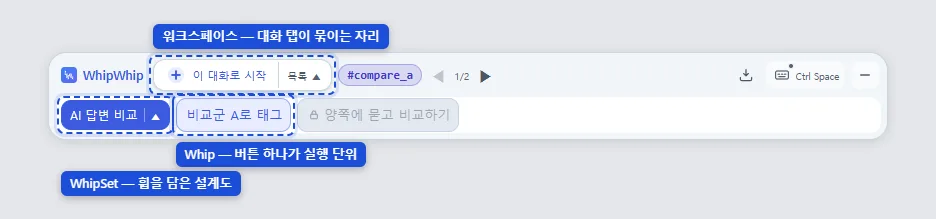 - **Whip** — 방금 누른 버튼 하나입니다. 정해둔 프롬프트 절차가 순서대로 실행됩니다.
- **WhipSet** — Whip 여럿을 담은 묶음입니다. 패널이 한 번에 하나를 띄우고, 남에게 주고받는
단위도 이것입니다.
- **워크스페이스** — 대화 탭들을 묶어 두는 자리입니다. 태그를 붙인 대화가 여기 있습니다.
### 여러 탭에 걸쳐 도는 것이 기본입니다
버튼 하나가 여러 챗봇 탭에 걸쳐 실행되고, 한 탭에서만 도는 것은 그 축약형입니다. 이를테면
GPT의 답을 Claude에게 검토시키거나, 같은 질문을 셋에 동시에 던져 답을 비교합니다.
아래는 그 흐름을 **실제로 돌린 화면**입니다. 갈래가 둘인 휩은 자리가 다 차기 전에는 잠겨 있고,
질문은 한 번만 쓰며, 두 답이 한 화면으로 돌아옵니다.
- **Whip** — 방금 누른 버튼 하나입니다. 정해둔 프롬프트 절차가 순서대로 실행됩니다.
- **WhipSet** — Whip 여럿을 담은 묶음입니다. 패널이 한 번에 하나를 띄우고, 남에게 주고받는
단위도 이것입니다.
- **워크스페이스** — 대화 탭들을 묶어 두는 자리입니다. 태그를 붙인 대화가 여기 있습니다.
### 여러 탭에 걸쳐 도는 것이 기본입니다
버튼 하나가 여러 챗봇 탭에 걸쳐 실행되고, 한 탭에서만 도는 것은 그 축약형입니다. 이를테면
GPT의 답을 Claude에게 검토시키거나, 같은 질문을 셋에 동시에 던져 답을 비교합니다.
아래는 그 흐름을 **실제로 돌린 화면**입니다. 갈래가 둘인 휩은 자리가 다 차기 전에는 잠겨 있고,
질문은 한 번만 쓰며, 두 답이 한 화면으로 돌아옵니다.


![두 봇의 답이 [A]와 [B]로 한 화면에 합쳐진 결과 창](/shots/ko/crosstab-fanin.webp) 질문에 답이 오면 그 답은 변수에 담깁니다 — 위의 "한 번 묻고 → 두 답" 사이가 바로 아래
"변수에 값이 들어오는 곳" 절이 말하는 그 축입니다.
사이트마다 화면 구조가 다른 것은 확장이 흡수합니다. 다만 **임시 대화**를 쓰는 Whip은
ChatGPT·Gemini에서만 그 단계가 돌고, Claude·Grok·Perplexity에서는 자동으로 건너뜁니다.
그 밖의 동작은 다섯 곳에서 같습니다.
## 어떻게 만드나
**빌더**에서 액션 카드를 쌓습니다. 카드를 직접 고르기 싫으면 [챗으로 만들기](https://whipwhip.center/make)에서 안내문을 복사해 평소 쓰는 챗에게 만들게 할 수도 있습니다. 사이드바는 세 섹션입니다 — **Actions**(쌓을 액션 팔레트) ·
**Tags**(대화에 붙이는 이름) · **Variables**(실행 중 담아 둔 값).
태그는 그 대화가 맡을 **역할**입니다. 이름을 붙이는 동시에 그 대화가 무슨 일을 하는 자리인지
정합니다.
질문에 답이 오면 그 답은 변수에 담깁니다 — 위의 "한 번 묻고 → 두 답" 사이가 바로 아래
"변수에 값이 들어오는 곳" 절이 말하는 그 축입니다.
사이트마다 화면 구조가 다른 것은 확장이 흡수합니다. 다만 **임시 대화**를 쓰는 Whip은
ChatGPT·Gemini에서만 그 단계가 돌고, Claude·Grok·Perplexity에서는 자동으로 건너뜁니다.
그 밖의 동작은 다섯 곳에서 같습니다.
## 어떻게 만드나
**빌더**에서 액션 카드를 쌓습니다. 카드를 직접 고르기 싫으면 [챗으로 만들기](https://whipwhip.center/make)에서 안내문을 복사해 평소 쓰는 챗에게 만들게 할 수도 있습니다. 사이드바는 세 섹션입니다 — **Actions**(쌓을 액션 팔레트) ·
**Tags**(대화에 붙이는 이름) · **Variables**(실행 중 담아 둔 값).
태그는 그 대화가 맡을 **역할**입니다. 이름을 붙이는 동시에 그 대화가 무슨 일을 하는 자리인지
정합니다.
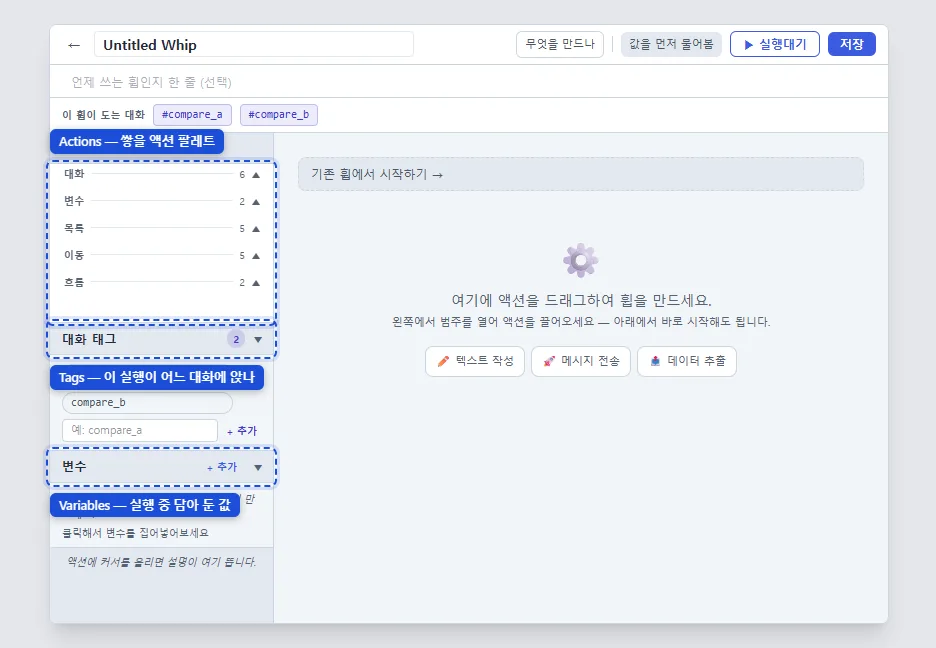 ### 하고 싶은 것에서 카드 찾기 — 액션 19종
표의 묶음은 **팔레트의 묶음 그대로**입니다. 표에서 고른 것을 화면에서 같은 이름으로 찾습니다.
| 하고 싶은 것 | 팔레트 묶음에서 |
|---|---|
| 프롬프트를 쓰고 보낸다 | **대화** — 쓰기 · 보내기 · 실행할 때 물어보기 |
| 답을 읽어 다음에 쓴다 | **대화** — 응답 담기 · 응답에서 원하는 부분만 뽑기 · 답을 기다리기 |
| 형식이 어긋나면 다시 묻는다 | **대화** — 검사하고 고쳐 달라고 다시 묻기 |
| 같은 질문을 여러 AI에 묻는다 | **대화** — 여러 AI에 보내기 (답을 한데 모은다) |
| 값을 하나 놓아 둔다 | **변수** — 값 놓기 |
| 여러 항목을 모으고 고친다 | **목록** — 더하기 · 갱신 · 부분 수정 · 빼기 · 걸러내기 |
| 다른 탭·대화로 간다 | **이동** — 목적지별 카드. 팔레트가 갈라 둡니다 |
| 지금 대화에 이름을 붙인다 | **이동** — 이 대화에 태그 붙이기 |
| 실행 도중 고르게 한다 | **흐름** — 선택지 보여 주기 |
| 결과를 보여 준다 | **흐름** — 결과 창 띄우기 |
| 챗이 쓴 휩셋을 들인다 | **흐름** — 휩셋 가져오기 (저장 전에 미리보기로 확인) |
이 열아홉이 만들 수 있는 전부입니다. 그래서 **남이 보낸 WhipSet에도 이 열아홉 밖의 것은
담겨 올 수 없습니다.**
### 변수에 값이 들어오는 곳
| 어디서 오나 | 언제 | 예 |
|---|---|---|
| 사람이 입력합니다 | 실행을 시작할 때 물어봅니다 | 주제 · 대상 독자 |
| 답에서 담습니다 | 응답을 읽어 변수에 넣습니다 | `{{var.answer}}` |
| 미리 박아 둡니다 | 셋에 고정값으로 넣어 둡니다 | 말투 지침 |
| 다른 변수에서 옵니다 | 이름으로 복사합니다 | 초안 → 검토용 |
| 확장이 채웁니다 | 날짜·시각·요일·타임스탬프·UUID·언어 | `{{var.today}}` |
## 알아 둘 것
### 남과 주고받기
WhipSet을 **잠근 뒤** 내보내면 긴 문자열 하나가 나옵니다. 잠금이 먼저인 이유는 내보낸 것이
나중에 고친 것과 조용히 갈라지지 않게 하기 위해서입니다. 업로드가 아니라 문자열이라 붙여넣을 수
있는 곳이면 어디로든 갑니다. 받는 쪽은 휩셋 목록의 **📥 가져오기**에 붙여넣으면 미리보기가 먼저
뜨고, 무엇이 들어오는지 본 다음 받습니다.
받을 때 확장이 먼저 거르는 것이 있습니다. 만들 수 없는 액션, 안전하지 않은 값, 규칙에 안 맞는
태그 이름이 걸리면 이유를 말하고 받지 않습니다.
**이 사이트가 그 주고받기의 한쪽 끝입니다.** [레시피](https://whipwhip.center/b/sets)에 올라온 것도 같은
문자열이고, 확장을 쓰고 있다면 새 글 지면에서 셋을 직접 채워 넣을 수 있어 문자열을 손으로
복사하지 않아도 됩니다. 올린 뒤 그 셋을 고쳐 다시 올리면, 받아 간 사람의 확장에 갱신이 있다고
표시됩니다.
### 한계
- **계정이 없습니다.** 만든 Whip과 설정은 이 브라우저에만 있고 다른 기기에서는 보이지 않습니다.
- **대화 내용은 브라우저를 벗어나지 않습니다.** 확장이 밖으로 내는 요청은 이 레시피 게시판의 글을
읽는 것 하나뿐이고, 나가는 것은 글 id뿐입니다. 자격 증명도 대화도 안 실립니다.
- **지원 사이트는 다섯 곳뿐입니다.** 아무 사이트에서나 도는 매크로가 아닙니다.
- 챗봇 사이트가 화면을 바꾸면 잠깐 어긋날 수 있습니다. 그때는 어긋난 서비스만 영향을 받습니다.
계정·보관·수집에 대한 자세한 답은 [FAQ](https://whipwhip.center/faq)에 있습니다.
---
Source: https://whipwhip.center/faq
## 계정이 필요한가요?
확장은 계정이 필요 없고 백엔드 서버도 없습니다. 이 사이트도 읽기는 로그인 없이 됩니다.
다만 **게시판에 글을 쓰려면 Google 로그인이 필요합니다.**
## 제 대화 내용이 어디로 가나요?
아무 데도 가지 않습니다. 대화 내용은 브라우저를 벗어나지 않습니다. 확장은 프롬프트·응답·페이지
내용을 전송하지 않습니다. 밖으로 내는 요청은 이 레시피 게시판의 글을 읽는 것 하나뿐이고, 그것도
글 id만 나갈 뿐 자격 증명도 대화도 안 실립니다. 만든 Whip과 설정은 이 브라우저에만 남습니다.
개발자는 사용자의 데이터를 받거나 보거나 저장하지 않습니다.
자세한 것은 [개인정보처리방침](https://whipwhip.center/legal/privacy)에 있습니다.
## 어떤 사이트에서 되나요?
ChatGPT · Claude · Gemini · Grok · Perplexity 다섯 곳입니다. 그 밖의 사이트에서는 확장이 아예
동작하지 않습니다. 다른 탭은 읽지 않습니다.
## 어떤 브라우저가 필요한가요?
Chrome·Edge 같은 크로미움 계열 **데스크톱 브라우저**입니다. 챗봇 화면 위에 패널을 얹고 여러 탭을
오가며 도는 구조라, 확장을 지원하지 않는 모바일 브라우저에서는 동작하지 않습니다. Firefox·Safari는
지원하지 않습니다.
## 유료인가요?
무료입니다. 수익화 계획은 없습니다.
## 만든 Whip을 남에게 어떻게 주나요?
휩셋을 잠근 뒤 내보내면 `ww2.`로 시작하는 긴 문자열이 나옵니다. 업로드가 아니라 문자열이라
붙여넣을 수 있는 곳이면 어디로든 갑니다. 받는 쪽은 휩셋 목록의 **📥 가져오기**에 붙여넣고,
미리보기로 무엇이 들어오는지 본 다음 받습니다.
## 남이 준 문자열이 안전한가요?
받는 쪽과 이 사이트가 각각 한 번씩 검사합니다. 코드를 값인 척 몰래 실행시키려는 셋은 통과하지
못합니다. 그리고 받기 전에 항상 내용을 먼저 보여 줍니다. 무엇이 들어오는지 보지 않고 받는
경로는 없습니다.
## 챗봇 사이트가 화면을 바꾸면요?
대개는 확장이 흡수합니다. 크게 바뀌면 잠깐 어긋날 수 있고, 그때는 어긋난 서비스만 영향을
받습니다. 사용자가 할 일은 없고, 확장 업데이트를 기다리시면 됩니다.
## 태그가 그냥 이름표인가요?
태그는 그 대화가 맡을 **역할**입니다. 이름을 붙이는 동시에, 그 대화가 무슨 일을 하는 자리인지
정합니다.
## 브라우저를 바꾸거나 확장을 지우면 제 Whip은요?
확장을 지우면 함께 사라지고, 다른 브라우저에는 따라오지 않습니다. 사본이 필요하면 설정의
내보내기로 백업을 만들어 두세요.
---
Source: https://whipwhip.center/guidelines
[레시피 게시판](https://whipwhip.center/b/sets)에 올릴 때 지켜 주셨으면 하는 것들입니다.
법적 고지가 아니라 이 게시판의 규칙입니다 — [이용약관](https://whipwhip.center/legal/tos)과 [개인정보처리방침](https://whipwhip.center/legal/privacy)은 따로 있습니다.
## 이런 글은 지웁니다
- 남을 해치거나 속이려고 만든 세트
- 광고·홍보만 있고 실제로 쓸 것이 없는 글
- 같은 것을 여러 번 올린 글
지우는 대신 **숨김**으로 목록에서 내립니다. 지금 그 판단은 한 사람이 하고,
지운 기록을 따로 공개하는 지면은 없습니다.
## 남이 만든 세트를 올릴 때
받은 문자열을 그대로 올리면, 그 안의 서명은 **원저자의 것으로 남습니다** — 세트 지면의
`서명키 지문`이 그것을 보여줍니다. 내 것으로 고쳐 쓴 세트는 서명이 내 것으로 바뀌고,
갈라져 나온 뿌리가 `계보`에 남습니다.
원저자가 원치 않는 세트라면 올리지 말아 주세요. 우리는 그 여부를 알 방법이 없습니다.
## 이 사이트가 확인하지 않는 것
올라온 세트를 **돌려보지 않습니다.** 그래서 확인해 드릴 수 없는 것이 셋입니다.
- 그 세트가 실제로 잘 도는지
- 붙어 있는 예시 출력이 정말 그 세트가 뱉은 것인지
- 세트 안의 프롬프트가 어떤 답을 만들어 낼지
대신 **무엇이 들어 있는지는 전부 보여 드립니다** — 세트 지면의 리더가 스텝·변수·태그와
바깥으로 나가는 주소를 그대로 폅니다. 받기 전에 그것을 읽어 주세요.
---
Source: https://whipwhip.center/make
# 휩휩 휩셋 만들어 줘
지금부터 휩휩(WhipWhip)의 **휩셋**을 설계해서 JSON 객체 하나로 써 주세요. 이 안내를 끝까지 먼저
읽으세요. 맨 끝 "내 요청" 아래에 제가 원하는 것을 적습니다. 꼭 필요한 정보가 빠졌을 때만 짧은 질문
하나를 하고, 그렇지 않으면 바로 JSON으로 답해 주세요.
## 휩휩이 무엇인가
휩휩은 브라우저 확장입니다. 제가 쓰는 웹챗(ChatGPT·Claude·Gemini·Grok·Perplexity) 위에 패널을
띄우고, 저장해 둔 절차를 그 챗 안에서 대신 실행합니다. 입력창에 글을 쓰고, 보내고, 답을 기다리고,
답을 읽어 일부를 저장하고, 결과를 보여 줍니다.
- **휩셋**은 휩을 모은 이름 있는 묶음입니다. 당신이 쓸 것이 이것입니다.
- **휩**은 버튼 하나입니다. 누르면 그 휩의 **카드**를 위에서 아래로 차례대로 실행합니다.
- **카드**는 한 단계입니다. 프롬프트 쓰기, 보내기, 답을 변수에 저장하기, 저에게 묻기, 다른 대화로
옮기기, 결과 보여 주기 같은 것입니다. 모든 카드에는 `card` 이름과 `config` 설정이 있습니다.
- **변수**는 이 휩셋의 휩들이 함께 쓰는 이름 있는 값입니다. 값은 실행이 끝나도 남기 때문에, 한 휩이
저장한 것을 다른 휩이 나중에 읽을 수 있습니다.
- **태그**는 역할입니다. 특정 대화 하나에 붙이는 이름입니다(예: `writer`, `critic`). 휩은 지금
대화에 역할을 붙이고, 나중에 그 대화로 돌아갈 수 있습니다. 서로 다른 두 챗 사이에 일을 넘기는
방법이 이것입니다.
휩휩은 API를 부르지 않습니다. 모든 일이 실제 챗 페이지에서, 제가 직접 입력한 것과 똑같이
일어납니다. 그래서 휩은 사람이 그 페이지에서 할 수 있는 일을 카드 하나씩 할 수 있을 뿐입니다.
## 카드가 어떻게 이어지나
**챗과 대화하기.** `prompt_write`는 입력창에 글을 넣습니다(보내지는 않습니다). `submit`은 그 글을
보내고 답이 다 나올 때까지 기다립니다. `submit` 뒤에는 답을 쓸 수 있습니다.
**답 남기기.** `var_save`에 `"valueSource": "var.last.assistant"`를 주면 가장 최근 답 전체를 변수에
저장합니다. 결과를 남기는 기본 방법입니다. `ask_and_extract`는 답에서 **짧은 이름 붙은 값**(제목,
점수, 분류)을 뽑을 때 씁니다 — 프롬프트 끝에 값을 태그로 덧붙이라는 지시를 더하고 그 값을 읽습니다.
긴 답 전체를 담는 데 쓰지 마세요. `extract_response`는 별도 임시 탭에서 구조화된 JSON을 받아 옵니다.
드물게만 쓰세요. `validate`는 최근 답이 형식(JSON, 정규식, 비어 있지 않음)을 지켰는지 보고, 아니면
챗에게 다시 요청합니다.
**저에게 묻기.** 두 가지입니다.
1. `user_input` 변수를 프롬프트에 토큰으로 넣습니다. 휩이 실행되기 전에 휩휩이 그 휩에 필요한
`user_input` 변수마다 작은 입력 폼을 보여 줍니다. 기본이고 보통 가장 좋습니다.
2. `input_prompt`는 실행 도중, 그 카드가 있는 자리에서 묻습니다. 그 순간에만 의미가 있는 질문
(예: 답을 읽은 뒤 "이 스크랩 이름은?")이거나, `"alwaysAsk": true`로 이미 채워진 값을 확인받을 때
씁니다.
`choice_prompt`는 선택지에서 고르게 합니다. 고정 목록(`options`에 한 줄에 하나)이나 목록 변수의
항목에서 고를 수 있습니다.
**결과 보여 주기.** `show_result_modal`은 변수로 만든 글을 창으로 띄웁니다. 제가 복사할 것 같으면
`"copyButton": "copy_body"`를 주세요.
**대화 옮겨 다니기.** `new_chat`은 같은 서비스에서 새 대화를 엽니다. `open_service`는 다른 서비스로
갑니다. `open_url`은 주소를 엽니다. `tag_current_chat`은 실행이 서 있는 대화에 역할을 붙입니다.
`go_to_role`은 그 역할을 가진 대화로 실행을 옮깁니다. 역할은 어떤 휩이 `go_to_role`로 가기 전에
먼저 `tag_current_chat`으로 붙어 있어야 합니다. 그래서 역할이 둘인 셋은 보통 역할마다 짧은 "시작"
휩을 두어 그 챗에 역할을 알려 주고 태그를 붙입니다: `prompt_write`(이 대화에서 너는 누구다) →
`submit` → `tag_current_chat`.
**목록.** `"valueType": "array"` 변수는 레코드 목록을 담습니다. `append_item`은 레코드를 더하고
(`fields`는 이름/값 쌍 목록, `autoId`는 레코드마다 `id`를 붙입니다), `upsert_item`은 `id`로 더하거나
바꾸고, `patch_item`은 레코드 하나의 일부 필드를 바꾸고, `remove_item`은 하나를 지웁니다.
`derive_index`는 목록을 글로 바꿔(항목마다 한 줄, `<>` 토큰이 든 템플릿으로) 다른 변수에
저장합니다. 그래야 프롬프트나 결과 창이 그 목록을 보여 줄 수 있습니다. 여러 번 실행에 걸쳐 무언가를
기억하는 셋(노트, 라이브러리, 기록)은 목록으로 만듭니다.
**변수.**
- `source: "user_input"` — 제가 줍니다(실행 전 폼, 또는 `input_prompt`).
- `source: "set_by_action"` — 카드가 씁니다: `var_save`, `input_prompt`, `choice_prompt`,
`ask_and_extract`, `extract_response`, `validate`(그 `variable`), `derive_index`, 목록 카드.
- `source: "constant"` — `defaultValue`에 적은 고정 글.
- 키는 영문자·숫자·`_`만 씁니다. 라벨은 제가 보는 이름이니 제 언어로 쓰세요.
- 카드가 쓰는 변수는 전부 `variables`에 선언해야 합니다.
## 토큰
카드 글 안에서 변수는 **`<>`**로 씁니다 — 양쪽에 꺾쇠 두 개씩입니다. 목록 템플릿 안에서는
`<>`입니다. `<>`는 오늘 날짜입니다.
**중괄호로 토큰을 쓰지 마세요.** `<<…>>`는 휩휩이 알아서 바꿉니다.
## JSON 모양
```text
{
"format": "whipwhip.authoring/1",
"name": "…", 셋 이름, 제 언어로
"description": "…", 선택, 한 문장
"inline_guide": "…", 선택, 셋 쓰는 법
"tags": [ { "name": "writer" } ], 역할. A–Z a–z 0–9 _ - 로 3–10자
"variables": [ { "key": "…", "label": "…", "source": "…", "required": true } ],
"whips": [
{
"label": "…", 버튼 글, 짧게
"description": "…", 선택
"preflightStyle": "form", 선택: "form"(기본) 또는 "none"
"scopeTags": [ "writer" ], 선택: 이 휩이 속한 역할 대화
"actions": [ { "card": "prompt_write", "config": { "text": "…" } } ]
}
]
}
```
id, `usedVars`, `requiresVars`, `producesVars`, `askInline`, 키, 서명, 버전은 **쓰지 마세요**.
휩휩이 채웁니다.
## 카드 레퍼런스
### `prompt_write`
채팅창에 내용을 입력하거나 수정합니다.
- `text` — 글, **필수**, <> 토큰 가능
- `mode` — 다음 중 하나 `replace` · `append` · `prepend`
- `preflight` — true 또는 false. 프롬프트의 <> 토큰에 대해 실행 전 입력 폼을 표시합니다
- `inputStyle` — 다음 중 하나 `form` · `inline`, 쓰이는 조건: `preflight` = `true`
### `submit`
작성된 내용을 전송하고, 대기를 끄지 않았다면 AI의 응답을 기다립니다.
- `skipWait` — true 또는 false. 전송 직후 다음 액션으로 넘어갑니다. 휩이 응답을 읽지 않을 때 사용합니다 — 예: 같은 프롬프트를 여러 탭에 뿌리는 경우.
### `input_prompt`
사용자에게 필요한 정보를 입력받습니다.
- `title` — 글
- `selectedVars` — `[{ "key": …, "question": … }]`, **필수**
- `inputStyle` — 다음 중 하나 `form` · `inline`
- `alwaysAsk` — true 또는 false. 변수에 이미 값이 있어도 이 입력을 표시해, 프리필된(또는 LLM이 뽑은) 값을 커밋 전에 검토·수정할 수 있게 합니다
### `ask_and_extract`
AI에게 질문하고 필요한 정보를 변수로 자동화하여 추출합니다.
- `text` — 글, **필수**, <> 토큰 가능
- `preflight` — true 또는 false. 프롬프트의 <> 토큰에 대해 실행 전 입력 폼을 표시합니다
- `inputStyle` — 다음 중 하나 `form` · `inline`, 쓰이는 조건: `preflight` = `true`
- `varsToExtract` — `[{ "key": …, "description": … }]`, **필수**
### `extract_response`
AI의 응답을 분석하여 구조화된 데이터로 변환합니다. 처리하는 동안 임시 탭이 포그라운드로 열립니다.
- `key` — 변수 키, **필수**. 캡처한 값을 저장할 변수 이름입니다.
- `schema` — 글, **필수**. AI가 반환할 JSON의 구조를 설명합니다.
- `promptSuffix` — 글. 추출 프롬프트에 추가되는 선택적 텍스트입니다.
- `retries` — 숫자. 유효하지 않은 JSON일 때 다시 요청할 횟수입니다.
### `validate`
응답이 형식을 지켰는지 보고 아니면 다시 요구합니다. 형식만 봅니다 — 내용이 맞는지는 판정할 수 없습니다.
- `source` — 다음 중 하나 `last_assistant` · `var`. 직전 응답 또는 저장된 변수. 변수는 검사만 합니다 — 다시 물어도 과거 값은 안 바뀝니다.
- `key` — 변수 키, 쓰이는 조건: `source` = `var`
- `rule` — 다음 중 하나 `json` · `regex` · `non_empty` · `whipset`, **필수**. JSON: 파싱됨(필수 키 지정 가능). 정규식: 패턴 일치. 비어있지 않음: 공백이 아닌 응답. 휩셋: 챗이 쓴 휩휩 휩셋 JSON — 틀리면 고칠 곳 목록을 실어 다시 요구합니다.
- `pattern` — 글, 쓰이는 조건: `rule` = `regex`
- `requiredKeys` — 글, 쓰이는 조건: `rule` = `json`. 쉼표로 구분한 최상위 키 목록.
- `retries` — 숫자. 실패로 끝내기 전 교정 프롬프트를 보낼 횟수. 0 = 검사만.
- `correction` — 글. 형식이 안 맞을 때 보냅니다. 비우면 기본 문구를 씁니다.
- `variable` — 변수 키
### `send_to_services`
같은 글을 고른 AI들에 보내고, 모든 답을 기다려 한 변수에 모읍니다. 지금 탭의 AI는 지금 탭에, 나머지는 뒤쪽 새 탭에 보냅니다.
- `servicesVar` — 변수 키, **필수**. AI 서비스 id의 JSON 배열이 담긴 변수. 보통 "AI 서비스" 소스 + 여러 개 선택으로 채웁니다.
- `text` — 글, **필수**, <> 토큰 가능. 모든 AI에 똑같이 보낼 글. 변수 토큰을 쓸 수 있습니다.
- `tagPrefix` — 글. 주면 AI마다 "이름_약자" 태그(약자 gpt·gem·cla·grk·ppx)를 대화에 붙여 다음에 이어서 물을 수 있게 합니다. 이름은 6자까지.
- `key` — 변수 키, **필수**. AI마다 제목과 답(또는 실패 사유)이 적힌 글이 저장됩니다.
### `var_save`
작성기, AI 응답 등의 내용을 변수에 담아 저장합니다.
- `valueSource` — 아래 값 출처 중 하나, 또는 `var.<변수 키>`, **필수**. 값을 읽어올 위치를 선택합니다.
- `key` — 변수 키, **필수**. 캡처한 값을 저장할 변수 이름입니다.
- `valueFilter` — 다음 중 하나 `""` · `code`, 다음 값에 따라 쓰임 `valueSource`
### `var_flush`
저장된 모든 변수 값을 초기화합니다.
설정 없음 — `"config": {}`.
### `append_item`
배열 변수에 항목을 추가합니다 (예: ADR 목록에 레코드 추가).
- `key` — 변수 키, **필수**. 변경할 배열 타입 변수. 먼저 변수 타입을 "array"로 설정하세요.
- `fields` — `[{ "name": …, "value": … }]`, **필수**, <> 토큰 가능. 추가할 레코드의 필드(이름 → 값). 값에 <> 토큰 사용 가능, 따옴표·개행은 자동 처리됩니다.
- `autoId` — true 또는 false. id를 직접 넣지 않으면 새 항목마다 안정적으로 증가하는 id를 붙입니다.
- `idPrefix` — 글, 쓰이는 조건: `autoId` = `true`. 숫자 앞에 붙는다. 예: "adr-" → adr-1, adr-2 …
### `upsert_item`
"id" 필드로 매칭해 배열 변수의 항목을 삽입하거나 갱신합니다.
- `key` — 변수 키, **필수**. 변경할 배열 타입 변수. 먼저 변수 타입을 "array"로 설정하세요.
- `fields` — `[{ "name": …, "value": … }]`, **필수**, <> 토큰 가능. 삽입/갱신할 레코드의 필드. "id" 필드를 포함하세요 — 교체할 기존 항목을 매칭합니다.
### `patch_item`
id로 매칭한 항목의 지정 필드만 수정하고 나머지 필드는 유지합니다 (예: 상태만 전환).
- `key` — 변수 키, **필수**. 변경할 배열 타입 변수. 먼저 변수 타입을 "array"로 설정하세요.
- `itemId` — 글, **필수**, <> 토큰 가능. 부분수정할 항목의 "id". <> 토큰을 지원합니다.
- `fields` — `[{ "name": …, "value": … }]`, **필수**, <> 토큰 가능. 이 필드들만 수정되고 항목의 나머지 필드는 유지됩니다. 값에 <> 토큰 사용 가능.
### `remove_item`
"id"로 배열 변수의 항목을 제거합니다.
- `key` — 변수 키, **필수**. 변경할 배열 타입 변수. 먼저 변수 타입을 "array"로 설정하세요.
- `itemId` — 글, **필수**, <> 토큰 가능. 제거할 항목의 "id". <> 토큰을 지원합니다.
### `derive_index`
배열 변수에서 항목당 한 줄씩 요약/인덱스 문자열을 만듭니다.
- `sourceKey` — 변수 키, **필수**. 요약할 배열 변수.
- `key` — 변수 키, **필수**. 파생된 인덱스 문자열을 받을 변수.
- `mode` — 다음 중 하나 `join` · `count`. 인덱스 문자열(기본), 또는 필터 후 남은 항목 수만.
- `itemTemplate` — 글, 쓰일 때 필수, <> 토큰 가능, 다음 값에 따라 쓰임 `mode`. 항목마다 렌더링해 줄바꿈으로 연결. <> 토큰 사용, 예: <> — <>.
- `filterField` — 글. 이 필드가 아래 값과 맞는 항목만 포함. 비우면 전체 포함.
- `filterOp` — 다음 중 하나 `eq` · `ne`, 다음 값에 따라 쓰임 `filterField`. 필드가 없는 항목은 어느 쪽이든 빈 값으로 칩니다.
- `filterValue` — 글, <> 토큰 가능, 다음 값에 따라 쓰임 `filterField`. 필터 필드와 비교할 값. <> 토큰 지원.
- `sortField` — 글. 렌더 전에 이 필드로 정렬합니다. 숫자를 인식하므로 adr-2가 adr-10보다 앞섭니다. 비우면 입력 순서를 유지합니다.
- `sortDir` — 다음 중 하나 `asc` · `desc`, 다음 값에 따라 쓰임 `sortField`
- `limit` — 숫자. 최대 이 개수만 유지. 비우면 전체.
- `limitFrom` — 다음 중 하나 `end` · `start`, 다음 값에 따라 쓰임 `limit`
### `go_to_role`
역할(태그)이 결속된 대화로 실행을 옮깁니다.
- `tagName` — 태그 이름
- `tagCandidates` — 태그 이름 목록. 이 스텝이 갈 수 있는 역할을 고르세요. 비우면 고정 라우팅입니다. 후보가 전부 결속돼야 실행됩니다.
- `tagVar` — 변수 키. 고른 역할 이름이 담긴 변수(예: 선택 스텝이 채움). 후보를 고른 경우에만 쓰입니다.
### `new_chat`
현재 서비스에서 새 대화를 엽니다.
- `isTemp` — 다음 중 하나 `false` · `true`
- `openMode` — 다음 중 하나 `current` · `new_tab` · `background`
### `open_service`
다른 AI 서비스로 전환합니다 (ChatGPT, Gemini, Claude…).
- `service` — 다음 중 하나 `chatgpt` · `gemini` · `claude` · `grok` · `perplexity`
- `openMode` — 다음 중 하나 `current` · `new_tab` · `background`
### `open_url`
https:// 주소로 이동합니다.
- `target` — 글
- `openMode` — 다음 중 하나 `current` · `new_tab` · `background`
### `tag_current_chat`
현재 대화에 태그를 붙여 관리합니다.
- `tagName` — 태그 이름, **필수**
### `choice_prompt`
사용자에게 옵션 목록을 보여주고, 고른 값을 변수에 담습니다.
- `label` — 글
- `optionsSource` — 다음 중 하나 `static` · `variable` · `services`. 선택지를 가져올 위치를 지정합니다. "AI 서비스"는 ChatGPT·Claude·Gemini·Grok·Perplexity를 채웁니다.
- `options` — 글, 쓰일 때 필수, 다음 값에 따라 쓰임 `optionsSource`. 각 줄이 버튼이 됩니다. 선택한 줄이 변수에 저장됩니다.
- `dynamicOptionsVar` — 변수 키, 쓰일 때 필수, 쓰이는 조건: `optionsSource` = `variable`. 선택지가 담긴 변수 (한 줄에 하나). 런타임에 파싱됩니다.
- `optionLabel` — 글, <> 토큰 가능, 쓰이는 조건: `optionsSource` = `variable`. 선택지마다 렌더되는 라벨 템플릿. <> 토큰 사용, 예: <> — <>.
- `optionValueField` — 글, 쓰이는 조건: `optionsSource` = `variable`. 선택된 값으로 쓸 항목 필드(기본 "id"). 뒤의 항목 수정/삭제에 항목 id로 넘깁니다.
- `multiple` — true 또는 false. 체크리스트로 띄우고 확인을 누르면 체크한 값들을 JSON 배열로 저장합니다.
- `lockCurrentService` — true 또는 false, 쓰이는 조건: `optionsSource` = `services`. 여러 개 선택일 때, 휩을 실행한 탭의 AI를 "지금 탭"으로 표시하고 체크한 채 잠급니다.
- `warnInConversation` — true 또는 false, 쓰이는 조건: `optionsSource` = `services`. 여러 개 선택일 때, 실행한 탭이 이미 대화 중이면 그 AI만 앞 맥락을 안고 답한다고 체크리스트 위에 알립니다.
- `continueGroup` — 글, 쓰이는 조건: `optionsSource` = `services`. 여러 개 선택일 때, 실행한 탭이 "이름_약자" 태그 무리에 속하면 맨 위에 "이어서 묻기" 행을 기본으로 켜고 그 AI들을 미리 체크합니다. "여러 AI에 보내기"의 태그 이름과 같게 둡니다.
- `rememberAs` — 글, 쓰이는 조건: `multiple` = `true`. 이름을 주면 이번 선택을 기억해 다음 실행에서 미리 체크합니다. 어느 탭·워크스페이스에서 실행해도 같은 기억을 씁니다.
- `key` — 변수 키, **필수**. 선택한 항목이 저장될 변수 키입니다.
### `show_result_modal`
변수에 저장된 값을 활용해 결과창을 띄웁니다.
- `title` — 글
- `body` — 글, **필수**
- `copyButton` — 다음 중 하나 `none` · `copy_body`
### `import_whipset`
변수에 든, 챗이 쓴 휩셋 JSON을 가져옵니다. 저장 전에 미리보기로 확인받습니다.
- `key` — 변수 키, **필수**. 보통 앞의 "검사" 카드(휩셋 규칙)가 저장한 변수입니다.
**값 출처(`var_save.valueSource`)**
`builtin.date_today` · `builtin.date_iso` · `builtin.time_now` · `builtin.timestamp` · `builtin.day_of_week` · `builtin.page_url` · `builtin.page_title` · `builtin.page_domain` · `builtin.language` · `builtin.random_uuid` · `builtin.selection` · `composer` · `var.last.user` · `var.last.assistant`
## 흔한 실수
- `<>` 대신 중괄호로 토큰 쓰기.
- 아무 카드도 쓰지 않는 `set_by_action` 변수, 또는 글에는 쓰면서 선언하지 않은 변수.
- `submit` 없이 답 읽기(`var_save`의 `var.last.assistant`).
- 실제로 보내야 하는데 `prompt_write` 뒤에 `submit`을 빠뜨리기.
- `"valueType": "array"`가 아닌 변수에 목록 카드 쓰기.
- 어떤 휩도 `tag_current_chat`으로 붙이지 않는 역할로 `go_to_role` 하기, 또는 `tags`에 선언하지 않은 태그.
- 10자를 넘거나, 공백이 있거나, `main`인 태그 이름.
- 카드에 없는 필드를 쓰거나 카드 이름을 지어내기.
- 긴 답 전체를 `ask_and_extract`로 담기 — `var_save`의 `var.last.assistant`를 쓰세요.
- 모든 걸 하는 거대한 휩 하나. 버튼이 분명한 휩 몇 개가 낫습니다.
## 예시
### 대화 하나: 초안을 다듬어 보여 주기
```json
{
"format": "whipwhip.authoring/1",
"name": "초안 다듬기",
"description": "거친 초안을 또렷하게 고쳐 쓰고 결과를 보여 줍니다.",
"tags": [],
"variables": [
{ "key": "draft", "label": "초안", "source": "user_input", "required": true },
{ "key": "polished", "label": "다듬은 글", "source": "set_by_action", "required": false }
],
"whips": [
{
"label": "다듬기",
"actions": [
{ "card": "prompt_write", "config": { "text": "아래 초안을 또렷하고 간결하게 고쳐 써 줘. 내 뜻과 말투는 지켜 줘. 고친 글만 답해.\n\n<>", "mode": "replace" } },
{ "card": "submit", "config": {} },
{ "card": "var_save", "config": { "valueSource": "var.last.assistant", "key": "polished" } },
{ "card": "show_result_modal", "config": { "title": "다듬은 글", "body": "<>", "copyButton": "copy_body" } }
]
}
]
}
```
### 역할 둘: 서로 다른 챗의 작가와 비평가
```json
{
"format": "whipwhip.authoring/1",
"name": "작가와 비평가",
"inline_guide": "챗 하나를 열고 '작가 시작', 다른 챗을 열고 '비평가 시작'을 누르세요. 그다음 어디서든 '쓰고 검토받기'를 실행합니다.",
"tags": [ { "name": "writer" }, { "name": "critic" } ],
"variables": [
{ "key": "task", "label": "쓸 것", "source": "user_input", "required": true },
{ "key": "draft", "label": "초안", "source": "set_by_action", "required": false },
{ "key": "review", "label": "비평", "source": "set_by_action", "required": false },
{ "key": "final", "label": "최종본", "source": "set_by_action", "required": false }
],
"whips": [
{
"label": "작가 시작",
"actions": [
{ "card": "prompt_write", "config": { "text": "이 대화에서 너는 내 작가야. 완성된 초안을 쓰고, 내가 비평을 가져오면 고쳐 써. '좋아'라고만 답해.", "mode": "replace" } },
{ "card": "submit", "config": {} },
{ "card": "tag_current_chat", "config": { "tagName": "writer" } }
]
},
{
"label": "비평가 시작",
"actions": [
{ "card": "prompt_write", "config": { "text": "이 대화에서 너는 까다로운 비평가야. 초안을 보여 주면 가장 약한 지점을 짧은 번호 목록으로 짚어. '좋아'라고만 답해.", "mode": "replace" } },
{ "card": "submit", "config": {} },
{ "card": "tag_current_chat", "config": { "tagName": "critic" } }
]
},
{
"label": "쓰고 검토받기",
"actions": [
{ "card": "go_to_role", "config": { "tagName": "writer" } },
{ "card": "prompt_write", "config": { "text": "<>", "mode": "replace" } },
{ "card": "submit", "config": {} },
{ "card": "var_save", "config": { "valueSource": "var.last.assistant", "key": "draft" } },
{ "card": "go_to_role", "config": { "tagName": "critic" } },
{ "card": "prompt_write", "config": { "text": "과제: <>\n\n초안:\n<>", "mode": "replace" } },
{ "card": "submit", "config": {} },
{ "card": "var_save", "config": { "valueSource": "var.last.assistant", "key": "review" } },
{ "card": "go_to_role", "config": { "tagName": "writer" } },
{ "card": "prompt_write", "config": { "text": "이 비평을 반영해 초안을 고쳐 줘. 고친 전문을 답해.\n\n<>", "mode": "replace" } },
{ "card": "submit", "config": {} },
{ "card": "var_save", "config": { "valueSource": "var.last.assistant", "key": "final" } },
{ "card": "show_result_modal", "config": { "title": "초안 · 비평 · 최종본", "body": "[초안]\n<>\n\n[비평]\n<>\n\n[최종본]\n<>", "copyButton": "copy_body" } }
]
}
]
}
```
### 쌓이는 목록: 답 스크랩 노트
```json
{
"format": "whipwhip.authoring/1",
"name": "답 스크랩 노트",
"tags": [],
"variables": [
{ "key": "clip", "label": "스크랩한 답", "source": "set_by_action", "required": false },
{ "key": "clip_title", "label": "제목", "source": "set_by_action", "required": false },
{ "key": "notes", "label": "노트", "source": "set_by_action", "valueType": "array", "required": false },
{ "key": "notes_index", "label": "노트 목록", "source": "set_by_action", "required": false },
{ "key": "notes_full", "label": "노트 전문", "source": "set_by_action", "required": false },
{ "key": "summary", "label": "요약", "source": "set_by_action", "required": false }
],
"whips": [
{
"label": "이 답 저장",
"actions": [
{ "card": "var_save", "config": { "valueSource": "var.last.assistant", "key": "clip" } },
{ "card": "input_prompt", "config": { "title": "이 답 저장", "selectedVars": [ { "key": "clip_title", "question": "짧은 제목을 붙여 주세요" } ], "inputStyle": "inline", "alwaysAsk": true } },
{ "card": "append_item", "config": { "key": "notes", "autoId": true, "idPrefix": "note-", "fields": [ { "name": "title", "value": "<>" }, { "name": "text", "value": "<>" }, { "name": "date", "value": "<>" } ] } },
{ "card": "derive_index", "config": { "sourceKey": "notes", "key": "notes_index", "itemTemplate": "<> — <> (<>)" } },
{ "card": "show_result_modal", "config": { "title": "노트", "body": "<>" } }
]
},
{
"label": "노트 요약",
"actions": [
{ "card": "derive_index", "config": { "sourceKey": "notes", "key": "notes_full", "itemTemplate": "### <>\n<>" } },
{ "card": "new_chat", "config": { "openMode": "current" } },
{ "card": "prompt_write", "config": { "text": "이 노트들에 공통으로 흐르는 것과 합치면 무엇이 되는지 정리해 줘.\n\n<>", "mode": "replace" } },
{ "card": "submit", "config": {} },
{ "card": "var_save", "config": { "valueSource": "var.last.assistant", "key": "summary" } },
{ "card": "show_result_modal", "config": { "title": "요약", "body": "<>", "copyButton": "copy_body" } }
]
}
]
}
```
## 출력 규칙
1. 제가 어떤 휩을 어떤 순서로 누를지 먼저 생각하고, 동작하는 가장 작은 셋을 설계하세요.
2. 이름·라벨·질문·프롬프트·결과 제목은 **제가 요청을 쓴 언어로** 쓰세요. 카드 이름, 필드 이름,
변수 키, 태그 이름은 이 안내에 적힌 그대로 둡니다.
3. 휩셋 전체를 담은 JSON 코드블록 **하나**로 답하세요. 블록 뒤에 어떤 버튼부터 누르면 되는지 짧은
문장 두 개까지만 덧붙여도 됩니다.
4. 제가 휩휩이 알려 준 고칠 곳 목록을 붙여넣으면, 전부 고쳐서 **완전한** JSON을 다시 보내 주세요.
고친 부분만 보내지 마세요.
## 내 요청
---
Source: https://whipwhip.center/use/dinner-tonight
# 오늘 저녁 뭐 먹지 — 챗봇 한 번에
매일 같은 질문을 챗봇에 다시 씁니다. "냉장고에 이거랑 이게 있는데 뭐 해먹지." 답을 받고,
레시피를 다시 묻고, 없는 재료를 메모장에 옮겨 적습니다. 다음 날 그 절차를 처음부터 또 합니다.
WhipWhip은 그 절차를 **버튼 하나**로 굳혀 둡니다.
## 어떻게 도는가
1. **재료를 한 번 적습니다.** 실행을 누르면 "냉장고에 뭐가 있나요"를 먼저 묻습니다 — 대충 적어도
됩니다. 이 값이 그 다음 질문들에 그대로 들어갑니다.
2. **만들 수 있는 메뉴가 나옵니다.** 재료로 실제로 되는 것만 고르라고 시킵니다. 무리하게 재료를
더 사야 하는 제안은 걸러집니다.
3. **고른 메뉴의 레시피를 받습니다.** 앞 답을 다시 붙여넣지 않습니다 — 받은 답이 다음 질문에
그대로 실립니다.
4. **없는 재료는 장바구니에 쌓입니다.** 장 보러 갈 때 그 목록만 꺼내 봅니다. 이번 주에 산 것과
다음 주 메뉴가 서로를 압니다.
## 왜 챗봇 하나로는 안 되나
되긴 합니다 — 매번 같은 문장을 다시 쓰고, 답을 복사해 다음 질문에 붙여넣고, 장바구니를 딴 데
적어 두면 됩니다. 이 셋이 매일 반복되는 손일이고, WhipWhip이 없애는 것이 정확히 그 손일입니다.
대화 하나에 이름을 붙여 두면 다음 실행도 **같은 대화**로 돌아가, 그 챗봇이 지난주 식단을
기억한 채로 이야기가 이어집니다.
## 필요한 것
Chrome·Edge 같은 크로미움 계열 **데스크톱 브라우저**와, 쓰던 챗봇 계정 하나면 됩니다.
WhipWhip은 무료이고 가입이 없습니다. 대화 내용은 브라우저를 벗어나지 않습니다.
## 가져가는 법
이 절차는 [게시판](https://whipwhip.center/b/sets)에 그대로 올라와 있습니다. 글에 있는 문자열 하나를 복사해
확장의 설정 → 임포트에 붙여넣으면 미리보기가 먼저 뜨고, 확인하면 내 것이 됩니다.
---
Source: https://whipwhip.center/use/explain-and-quiz
# 설명 듣고 퀴즈까지 — 챗봇으로 공부
설명을 받으면 대개 이해한 것 같습니다. 그게 진짜인지는 문제를 풀어 봐야 알고, 문제를 만들려면
챗봇에 다시 요청해야 하고, 틀린 것을 따로 적어 두는 것은 또 다른 일입니다. 세 단계가 끊기면
공부는 거기서 멈춥니다. WhipWhip은 셋을 **한 절차**로 붙입니다.
## 어떻게 도는가
1. **모르는 것을 적습니다.** 개념 이름이든 문장이든 됩니다.
2. **설명을 받습니다.** 수준을 지정해 두면 매번 같은 눈높이로 옵니다.
3. **바로 5문제가 나옵니다.** 방금 그 설명에서 나온 문제라, "설명은 쉬웠는데 문제는 딴 데서
나오는" 어긋남이 없습니다.
4. **틀린 것만 쌓입니다.** 맞힌 것은 지나가고 약한 자리만 남습니다. 다음에 그것만 골라 복습합니다.
## 왜 대화 하나로는 흩어지나
같은 주제를 다시 물으면 챗봇은 지난번에 무엇을 틀렸는지 모릅니다. 대화에 이름을 붙여 두면
어느 실행에서든 **그 대화**로 돌아가므로, 쌓인 오답이 이어집니다. 흩어지는 것은 지식이 아니라
맥락이고, 맥락을 붙들어 두는 것이 이 절차가 하는 일입니다.
## 필요한 것
Chrome·Edge 같은 크로미움 계열 **데스크톱 브라우저**와, 쓰던 챗봇 계정 하나. WhipWhip은
무료이고 가입이 없습니다. 대화 내용은 브라우저를 벗어나지 않습니다.
## 가져가는 법
이 절차는 [게시판](https://whipwhip.center/b/sets)에 올라와 있습니다. 문자열 하나를 복사해 확장의 설정 → 임포트에
붙여넣으면 미리보기가 먼저 뜨고, 확인하면 내 것이 됩니다.
---
Source: https://whipwhip.center/use/fact-check
# 이 말이 사실인가 — 챗봇 셋에 한 번에
어디서 본 이야기를 챗봇 하나에 물으면 답은 하나입니다. 그 답이 맞는지 확인하려면 다른 챗봇 탭을
열고, 같은 문장을 다시 쓰고, 두 답을 눈으로 비교해야 합니다. WhipWhip은 그 왕복을 **한 번의 실행**
으로 접습니다.
## 어떻게 도는가
1. **확인할 문장을 한 번 적습니다.** 링크든 들은 이야기든 그대로 붙여넣습니다.
2. **세 곳에 동시에 갑니다.** Perplexity·ChatGPT·Claude가 각자의 탭에서 같은 질문을 받습니다.
묻는 문장이 셋 다 같기 때문에 답의 차이가 **모델의 차이**로만 남습니다.
3. **답이 한 화면에 모입니다.** 셋을 나란히 놓고 읽습니다.
4. **갈리면 그게 신호입니다.** 세 답이 같은 방향이면 대체로 안전하고, 하나가 딴소리를 하면
거기가 파볼 자리입니다. 확신의 크기가 아니라 **불일치의 위치**를 봅니다.
## 왜 한 곳만 믿기 어려운가
챗봇은 모르는 것을 모른다고 말하기보다 그럴듯하게 채워 넣는 쪽으로 기웁니다. 그 실패는 한
모델 안에서는 잘 안 보입니다 — 자기 답을 자기가 검토하면 대개 통과시킵니다. 서로 다른 모델
셋에게 같은 질문을 주면 그 실패가 **불일치**로 드러납니다. 한 봇의 답을 다른 봇에게 넘겨
검토시키는 것도 같은 축이고, WhipWhip은 그 넘김을 손이 아니라 절차로 합니다.
## 필요한 것
Chrome·Edge 같은 크로미움 계열 **데스크톱 브라우저**와, 쓰려는 서비스의 로그인입니다. 셋 다
없어도 됩니다 — 가진 것만으로 돌려도 같은 방식으로 작동합니다. WhipWhip은 무료이고 가입이
없습니다. 대화 내용은 브라우저를 벗어나지 않습니다.
## 가져가는 법
이 절차는 [게시판](https://whipwhip.center/b/sets)에 올라와 있습니다. 문자열 하나를 복사해 확장의 설정 → 임포트에
붙여넣으면 됩니다 — 미리보기가 먼저 뜹니다.
---
Source: https://whipwhip.center/en/guide
WhipWhip is a **panel that overlays** the web chat UIs of ChatGPT, Claude, Gemini, Grok, and
Perplexity. You assemble a repeated prompt procedure once as a "Whip" — a button — and run it
with a click from then on.
## What it is
### Opening the panel
Open any of the five supported sites and the panel comes with it.
From the keyboard it is **`Ctrl+Space`**, and that shortcut can be rebound in Settings.
### Press a preset first
A fresh install starts with an empty list, but you do not have to build from scratch. The last
page of the intro offers these three as cards — picking one and pressing it is the quickest way in.
- **Compare AI Answers** — send the question in your message box to the bots you check and see every answer together.
- **Context Carry** — pull the gist out of a long conversation and open a fresh chat with it.
- **Prompt Polisher** — turn a rough idea into a prompt.
Six more (Adversarial Refine · Insight Clipper · Prompt Library · Writing Studio ·
Decision War Room · Study Coach) are in the **Presets gallery**. If you skipped the cards in the
intro, all three are there too.
### Once you have pressed one, three names show up
### 하고 싶은 것에서 카드 찾기 — 액션 19종
표의 묶음은 **팔레트의 묶음 그대로**입니다. 표에서 고른 것을 화면에서 같은 이름으로 찾습니다.
| 하고 싶은 것 | 팔레트 묶음에서 |
|---|---|
| 프롬프트를 쓰고 보낸다 | **대화** — 쓰기 · 보내기 · 실행할 때 물어보기 |
| 답을 읽어 다음에 쓴다 | **대화** — 응답 담기 · 응답에서 원하는 부분만 뽑기 · 답을 기다리기 |
| 형식이 어긋나면 다시 묻는다 | **대화** — 검사하고 고쳐 달라고 다시 묻기 |
| 같은 질문을 여러 AI에 묻는다 | **대화** — 여러 AI에 보내기 (답을 한데 모은다) |
| 값을 하나 놓아 둔다 | **변수** — 값 놓기 |
| 여러 항목을 모으고 고친다 | **목록** — 더하기 · 갱신 · 부분 수정 · 빼기 · 걸러내기 |
| 다른 탭·대화로 간다 | **이동** — 목적지별 카드. 팔레트가 갈라 둡니다 |
| 지금 대화에 이름을 붙인다 | **이동** — 이 대화에 태그 붙이기 |
| 실행 도중 고르게 한다 | **흐름** — 선택지 보여 주기 |
| 결과를 보여 준다 | **흐름** — 결과 창 띄우기 |
| 챗이 쓴 휩셋을 들인다 | **흐름** — 휩셋 가져오기 (저장 전에 미리보기로 확인) |
이 열아홉이 만들 수 있는 전부입니다. 그래서 **남이 보낸 WhipSet에도 이 열아홉 밖의 것은
담겨 올 수 없습니다.**
### 변수에 값이 들어오는 곳
| 어디서 오나 | 언제 | 예 |
|---|---|---|
| 사람이 입력합니다 | 실행을 시작할 때 물어봅니다 | 주제 · 대상 독자 |
| 답에서 담습니다 | 응답을 읽어 변수에 넣습니다 | `{{var.answer}}` |
| 미리 박아 둡니다 | 셋에 고정값으로 넣어 둡니다 | 말투 지침 |
| 다른 변수에서 옵니다 | 이름으로 복사합니다 | 초안 → 검토용 |
| 확장이 채웁니다 | 날짜·시각·요일·타임스탬프·UUID·언어 | `{{var.today}}` |
## 알아 둘 것
### 남과 주고받기
WhipSet을 **잠근 뒤** 내보내면 긴 문자열 하나가 나옵니다. 잠금이 먼저인 이유는 내보낸 것이
나중에 고친 것과 조용히 갈라지지 않게 하기 위해서입니다. 업로드가 아니라 문자열이라 붙여넣을 수
있는 곳이면 어디로든 갑니다. 받는 쪽은 휩셋 목록의 **📥 가져오기**에 붙여넣으면 미리보기가 먼저
뜨고, 무엇이 들어오는지 본 다음 받습니다.
받을 때 확장이 먼저 거르는 것이 있습니다. 만들 수 없는 액션, 안전하지 않은 값, 규칙에 안 맞는
태그 이름이 걸리면 이유를 말하고 받지 않습니다.
**이 사이트가 그 주고받기의 한쪽 끝입니다.** [레시피](https://whipwhip.center/b/sets)에 올라온 것도 같은
문자열이고, 확장을 쓰고 있다면 새 글 지면에서 셋을 직접 채워 넣을 수 있어 문자열을 손으로
복사하지 않아도 됩니다. 올린 뒤 그 셋을 고쳐 다시 올리면, 받아 간 사람의 확장에 갱신이 있다고
표시됩니다.
### 한계
- **계정이 없습니다.** 만든 Whip과 설정은 이 브라우저에만 있고 다른 기기에서는 보이지 않습니다.
- **대화 내용은 브라우저를 벗어나지 않습니다.** 확장이 밖으로 내는 요청은 이 레시피 게시판의 글을
읽는 것 하나뿐이고, 나가는 것은 글 id뿐입니다. 자격 증명도 대화도 안 실립니다.
- **지원 사이트는 다섯 곳뿐입니다.** 아무 사이트에서나 도는 매크로가 아닙니다.
- 챗봇 사이트가 화면을 바꾸면 잠깐 어긋날 수 있습니다. 그때는 어긋난 서비스만 영향을 받습니다.
계정·보관·수집에 대한 자세한 답은 [FAQ](https://whipwhip.center/faq)에 있습니다.
---
Source: https://whipwhip.center/faq
## 계정이 필요한가요?
확장은 계정이 필요 없고 백엔드 서버도 없습니다. 이 사이트도 읽기는 로그인 없이 됩니다.
다만 **게시판에 글을 쓰려면 Google 로그인이 필요합니다.**
## 제 대화 내용이 어디로 가나요?
아무 데도 가지 않습니다. 대화 내용은 브라우저를 벗어나지 않습니다. 확장은 프롬프트·응답·페이지
내용을 전송하지 않습니다. 밖으로 내는 요청은 이 레시피 게시판의 글을 읽는 것 하나뿐이고, 그것도
글 id만 나갈 뿐 자격 증명도 대화도 안 실립니다. 만든 Whip과 설정은 이 브라우저에만 남습니다.
개발자는 사용자의 데이터를 받거나 보거나 저장하지 않습니다.
자세한 것은 [개인정보처리방침](https://whipwhip.center/legal/privacy)에 있습니다.
## 어떤 사이트에서 되나요?
ChatGPT · Claude · Gemini · Grok · Perplexity 다섯 곳입니다. 그 밖의 사이트에서는 확장이 아예
동작하지 않습니다. 다른 탭은 읽지 않습니다.
## 어떤 브라우저가 필요한가요?
Chrome·Edge 같은 크로미움 계열 **데스크톱 브라우저**입니다. 챗봇 화면 위에 패널을 얹고 여러 탭을
오가며 도는 구조라, 확장을 지원하지 않는 모바일 브라우저에서는 동작하지 않습니다. Firefox·Safari는
지원하지 않습니다.
## 유료인가요?
무료입니다. 수익화 계획은 없습니다.
## 만든 Whip을 남에게 어떻게 주나요?
휩셋을 잠근 뒤 내보내면 `ww2.`로 시작하는 긴 문자열이 나옵니다. 업로드가 아니라 문자열이라
붙여넣을 수 있는 곳이면 어디로든 갑니다. 받는 쪽은 휩셋 목록의 **📥 가져오기**에 붙여넣고,
미리보기로 무엇이 들어오는지 본 다음 받습니다.
## 남이 준 문자열이 안전한가요?
받는 쪽과 이 사이트가 각각 한 번씩 검사합니다. 코드를 값인 척 몰래 실행시키려는 셋은 통과하지
못합니다. 그리고 받기 전에 항상 내용을 먼저 보여 줍니다. 무엇이 들어오는지 보지 않고 받는
경로는 없습니다.
## 챗봇 사이트가 화면을 바꾸면요?
대개는 확장이 흡수합니다. 크게 바뀌면 잠깐 어긋날 수 있고, 그때는 어긋난 서비스만 영향을
받습니다. 사용자가 할 일은 없고, 확장 업데이트를 기다리시면 됩니다.
## 태그가 그냥 이름표인가요?
태그는 그 대화가 맡을 **역할**입니다. 이름을 붙이는 동시에, 그 대화가 무슨 일을 하는 자리인지
정합니다.
## 브라우저를 바꾸거나 확장을 지우면 제 Whip은요?
확장을 지우면 함께 사라지고, 다른 브라우저에는 따라오지 않습니다. 사본이 필요하면 설정의
내보내기로 백업을 만들어 두세요.
---
Source: https://whipwhip.center/guidelines
[레시피 게시판](https://whipwhip.center/b/sets)에 올릴 때 지켜 주셨으면 하는 것들입니다.
법적 고지가 아니라 이 게시판의 규칙입니다 — [이용약관](https://whipwhip.center/legal/tos)과 [개인정보처리방침](https://whipwhip.center/legal/privacy)은 따로 있습니다.
## 이런 글은 지웁니다
- 남을 해치거나 속이려고 만든 세트
- 광고·홍보만 있고 실제로 쓸 것이 없는 글
- 같은 것을 여러 번 올린 글
지우는 대신 **숨김**으로 목록에서 내립니다. 지금 그 판단은 한 사람이 하고,
지운 기록을 따로 공개하는 지면은 없습니다.
## 남이 만든 세트를 올릴 때
받은 문자열을 그대로 올리면, 그 안의 서명은 **원저자의 것으로 남습니다** — 세트 지면의
`서명키 지문`이 그것을 보여줍니다. 내 것으로 고쳐 쓴 세트는 서명이 내 것으로 바뀌고,
갈라져 나온 뿌리가 `계보`에 남습니다.
원저자가 원치 않는 세트라면 올리지 말아 주세요. 우리는 그 여부를 알 방법이 없습니다.
## 이 사이트가 확인하지 않는 것
올라온 세트를 **돌려보지 않습니다.** 그래서 확인해 드릴 수 없는 것이 셋입니다.
- 그 세트가 실제로 잘 도는지
- 붙어 있는 예시 출력이 정말 그 세트가 뱉은 것인지
- 세트 안의 프롬프트가 어떤 답을 만들어 낼지
대신 **무엇이 들어 있는지는 전부 보여 드립니다** — 세트 지면의 리더가 스텝·변수·태그와
바깥으로 나가는 주소를 그대로 폅니다. 받기 전에 그것을 읽어 주세요.
---
Source: https://whipwhip.center/make
# 휩휩 휩셋 만들어 줘
지금부터 휩휩(WhipWhip)의 **휩셋**을 설계해서 JSON 객체 하나로 써 주세요. 이 안내를 끝까지 먼저
읽으세요. 맨 끝 "내 요청" 아래에 제가 원하는 것을 적습니다. 꼭 필요한 정보가 빠졌을 때만 짧은 질문
하나를 하고, 그렇지 않으면 바로 JSON으로 답해 주세요.
## 휩휩이 무엇인가
휩휩은 브라우저 확장입니다. 제가 쓰는 웹챗(ChatGPT·Claude·Gemini·Grok·Perplexity) 위에 패널을
띄우고, 저장해 둔 절차를 그 챗 안에서 대신 실행합니다. 입력창에 글을 쓰고, 보내고, 답을 기다리고,
답을 읽어 일부를 저장하고, 결과를 보여 줍니다.
- **휩셋**은 휩을 모은 이름 있는 묶음입니다. 당신이 쓸 것이 이것입니다.
- **휩**은 버튼 하나입니다. 누르면 그 휩의 **카드**를 위에서 아래로 차례대로 실행합니다.
- **카드**는 한 단계입니다. 프롬프트 쓰기, 보내기, 답을 변수에 저장하기, 저에게 묻기, 다른 대화로
옮기기, 결과 보여 주기 같은 것입니다. 모든 카드에는 `card` 이름과 `config` 설정이 있습니다.
- **변수**는 이 휩셋의 휩들이 함께 쓰는 이름 있는 값입니다. 값은 실행이 끝나도 남기 때문에, 한 휩이
저장한 것을 다른 휩이 나중에 읽을 수 있습니다.
- **태그**는 역할입니다. 특정 대화 하나에 붙이는 이름입니다(예: `writer`, `critic`). 휩은 지금
대화에 역할을 붙이고, 나중에 그 대화로 돌아갈 수 있습니다. 서로 다른 두 챗 사이에 일을 넘기는
방법이 이것입니다.
휩휩은 API를 부르지 않습니다. 모든 일이 실제 챗 페이지에서, 제가 직접 입력한 것과 똑같이
일어납니다. 그래서 휩은 사람이 그 페이지에서 할 수 있는 일을 카드 하나씩 할 수 있을 뿐입니다.
## 카드가 어떻게 이어지나
**챗과 대화하기.** `prompt_write`는 입력창에 글을 넣습니다(보내지는 않습니다). `submit`은 그 글을
보내고 답이 다 나올 때까지 기다립니다. `submit` 뒤에는 답을 쓸 수 있습니다.
**답 남기기.** `var_save`에 `"valueSource": "var.last.assistant"`를 주면 가장 최근 답 전체를 변수에
저장합니다. 결과를 남기는 기본 방법입니다. `ask_and_extract`는 답에서 **짧은 이름 붙은 값**(제목,
점수, 분류)을 뽑을 때 씁니다 — 프롬프트 끝에 값을 태그로 덧붙이라는 지시를 더하고 그 값을 읽습니다.
긴 답 전체를 담는 데 쓰지 마세요. `extract_response`는 별도 임시 탭에서 구조화된 JSON을 받아 옵니다.
드물게만 쓰세요. `validate`는 최근 답이 형식(JSON, 정규식, 비어 있지 않음)을 지켰는지 보고, 아니면
챗에게 다시 요청합니다.
**저에게 묻기.** 두 가지입니다.
1. `user_input` 변수를 프롬프트에 토큰으로 넣습니다. 휩이 실행되기 전에 휩휩이 그 휩에 필요한
`user_input` 변수마다 작은 입력 폼을 보여 줍니다. 기본이고 보통 가장 좋습니다.
2. `input_prompt`는 실행 도중, 그 카드가 있는 자리에서 묻습니다. 그 순간에만 의미가 있는 질문
(예: 답을 읽은 뒤 "이 스크랩 이름은?")이거나, `"alwaysAsk": true`로 이미 채워진 값을 확인받을 때
씁니다.
`choice_prompt`는 선택지에서 고르게 합니다. 고정 목록(`options`에 한 줄에 하나)이나 목록 변수의
항목에서 고를 수 있습니다.
**결과 보여 주기.** `show_result_modal`은 변수로 만든 글을 창으로 띄웁니다. 제가 복사할 것 같으면
`"copyButton": "copy_body"`를 주세요.
**대화 옮겨 다니기.** `new_chat`은 같은 서비스에서 새 대화를 엽니다. `open_service`는 다른 서비스로
갑니다. `open_url`은 주소를 엽니다. `tag_current_chat`은 실행이 서 있는 대화에 역할을 붙입니다.
`go_to_role`은 그 역할을 가진 대화로 실행을 옮깁니다. 역할은 어떤 휩이 `go_to_role`로 가기 전에
먼저 `tag_current_chat`으로 붙어 있어야 합니다. 그래서 역할이 둘인 셋은 보통 역할마다 짧은 "시작"
휩을 두어 그 챗에 역할을 알려 주고 태그를 붙입니다: `prompt_write`(이 대화에서 너는 누구다) →
`submit` → `tag_current_chat`.
**목록.** `"valueType": "array"` 변수는 레코드 목록을 담습니다. `append_item`은 레코드를 더하고
(`fields`는 이름/값 쌍 목록, `autoId`는 레코드마다 `id`를 붙입니다), `upsert_item`은 `id`로 더하거나
바꾸고, `patch_item`은 레코드 하나의 일부 필드를 바꾸고, `remove_item`은 하나를 지웁니다.
`derive_index`는 목록을 글로 바꿔(항목마다 한 줄, `<>` 토큰이 든 템플릿으로) 다른 변수에
저장합니다. 그래야 프롬프트나 결과 창이 그 목록을 보여 줄 수 있습니다. 여러 번 실행에 걸쳐 무언가를
기억하는 셋(노트, 라이브러리, 기록)은 목록으로 만듭니다.
**변수.**
- `source: "user_input"` — 제가 줍니다(실행 전 폼, 또는 `input_prompt`).
- `source: "set_by_action"` — 카드가 씁니다: `var_save`, `input_prompt`, `choice_prompt`,
`ask_and_extract`, `extract_response`, `validate`(그 `variable`), `derive_index`, 목록 카드.
- `source: "constant"` — `defaultValue`에 적은 고정 글.
- 키는 영문자·숫자·`_`만 씁니다. 라벨은 제가 보는 이름이니 제 언어로 쓰세요.
- 카드가 쓰는 변수는 전부 `variables`에 선언해야 합니다.
## 토큰
카드 글 안에서 변수는 **`<>`**로 씁니다 — 양쪽에 꺾쇠 두 개씩입니다. 목록 템플릿 안에서는
`<>`입니다. `<>`는 오늘 날짜입니다.
**중괄호로 토큰을 쓰지 마세요.** `<<…>>`는 휩휩이 알아서 바꿉니다.
## JSON 모양
```text
{
"format": "whipwhip.authoring/1",
"name": "…", 셋 이름, 제 언어로
"description": "…", 선택, 한 문장
"inline_guide": "…", 선택, 셋 쓰는 법
"tags": [ { "name": "writer" } ], 역할. A–Z a–z 0–9 _ - 로 3–10자
"variables": [ { "key": "…", "label": "…", "source": "…", "required": true } ],
"whips": [
{
"label": "…", 버튼 글, 짧게
"description": "…", 선택
"preflightStyle": "form", 선택: "form"(기본) 또는 "none"
"scopeTags": [ "writer" ], 선택: 이 휩이 속한 역할 대화
"actions": [ { "card": "prompt_write", "config": { "text": "…" } } ]
}
]
}
```
id, `usedVars`, `requiresVars`, `producesVars`, `askInline`, 키, 서명, 버전은 **쓰지 마세요**.
휩휩이 채웁니다.
## 카드 레퍼런스
### `prompt_write`
채팅창에 내용을 입력하거나 수정합니다.
- `text` — 글, **필수**, <> 토큰 가능
- `mode` — 다음 중 하나 `replace` · `append` · `prepend`
- `preflight` — true 또는 false. 프롬프트의 <> 토큰에 대해 실행 전 입력 폼을 표시합니다
- `inputStyle` — 다음 중 하나 `form` · `inline`, 쓰이는 조건: `preflight` = `true`
### `submit`
작성된 내용을 전송하고, 대기를 끄지 않았다면 AI의 응답을 기다립니다.
- `skipWait` — true 또는 false. 전송 직후 다음 액션으로 넘어갑니다. 휩이 응답을 읽지 않을 때 사용합니다 — 예: 같은 프롬프트를 여러 탭에 뿌리는 경우.
### `input_prompt`
사용자에게 필요한 정보를 입력받습니다.
- `title` — 글
- `selectedVars` — `[{ "key": …, "question": … }]`, **필수**
- `inputStyle` — 다음 중 하나 `form` · `inline`
- `alwaysAsk` — true 또는 false. 변수에 이미 값이 있어도 이 입력을 표시해, 프리필된(또는 LLM이 뽑은) 값을 커밋 전에 검토·수정할 수 있게 합니다
### `ask_and_extract`
AI에게 질문하고 필요한 정보를 변수로 자동화하여 추출합니다.
- `text` — 글, **필수**, <> 토큰 가능
- `preflight` — true 또는 false. 프롬프트의 <> 토큰에 대해 실행 전 입력 폼을 표시합니다
- `inputStyle` — 다음 중 하나 `form` · `inline`, 쓰이는 조건: `preflight` = `true`
- `varsToExtract` — `[{ "key": …, "description": … }]`, **필수**
### `extract_response`
AI의 응답을 분석하여 구조화된 데이터로 변환합니다. 처리하는 동안 임시 탭이 포그라운드로 열립니다.
- `key` — 변수 키, **필수**. 캡처한 값을 저장할 변수 이름입니다.
- `schema` — 글, **필수**. AI가 반환할 JSON의 구조를 설명합니다.
- `promptSuffix` — 글. 추출 프롬프트에 추가되는 선택적 텍스트입니다.
- `retries` — 숫자. 유효하지 않은 JSON일 때 다시 요청할 횟수입니다.
### `validate`
응답이 형식을 지켰는지 보고 아니면 다시 요구합니다. 형식만 봅니다 — 내용이 맞는지는 판정할 수 없습니다.
- `source` — 다음 중 하나 `last_assistant` · `var`. 직전 응답 또는 저장된 변수. 변수는 검사만 합니다 — 다시 물어도 과거 값은 안 바뀝니다.
- `key` — 변수 키, 쓰이는 조건: `source` = `var`
- `rule` — 다음 중 하나 `json` · `regex` · `non_empty` · `whipset`, **필수**. JSON: 파싱됨(필수 키 지정 가능). 정규식: 패턴 일치. 비어있지 않음: 공백이 아닌 응답. 휩셋: 챗이 쓴 휩휩 휩셋 JSON — 틀리면 고칠 곳 목록을 실어 다시 요구합니다.
- `pattern` — 글, 쓰이는 조건: `rule` = `regex`
- `requiredKeys` — 글, 쓰이는 조건: `rule` = `json`. 쉼표로 구분한 최상위 키 목록.
- `retries` — 숫자. 실패로 끝내기 전 교정 프롬프트를 보낼 횟수. 0 = 검사만.
- `correction` — 글. 형식이 안 맞을 때 보냅니다. 비우면 기본 문구를 씁니다.
- `variable` — 변수 키
### `send_to_services`
같은 글을 고른 AI들에 보내고, 모든 답을 기다려 한 변수에 모읍니다. 지금 탭의 AI는 지금 탭에, 나머지는 뒤쪽 새 탭에 보냅니다.
- `servicesVar` — 변수 키, **필수**. AI 서비스 id의 JSON 배열이 담긴 변수. 보통 "AI 서비스" 소스 + 여러 개 선택으로 채웁니다.
- `text` — 글, **필수**, <> 토큰 가능. 모든 AI에 똑같이 보낼 글. 변수 토큰을 쓸 수 있습니다.
- `tagPrefix` — 글. 주면 AI마다 "이름_약자" 태그(약자 gpt·gem·cla·grk·ppx)를 대화에 붙여 다음에 이어서 물을 수 있게 합니다. 이름은 6자까지.
- `key` — 변수 키, **필수**. AI마다 제목과 답(또는 실패 사유)이 적힌 글이 저장됩니다.
### `var_save`
작성기, AI 응답 등의 내용을 변수에 담아 저장합니다.
- `valueSource` — 아래 값 출처 중 하나, 또는 `var.<변수 키>`, **필수**. 값을 읽어올 위치를 선택합니다.
- `key` — 변수 키, **필수**. 캡처한 값을 저장할 변수 이름입니다.
- `valueFilter` — 다음 중 하나 `""` · `code`, 다음 값에 따라 쓰임 `valueSource`
### `var_flush`
저장된 모든 변수 값을 초기화합니다.
설정 없음 — `"config": {}`.
### `append_item`
배열 변수에 항목을 추가합니다 (예: ADR 목록에 레코드 추가).
- `key` — 변수 키, **필수**. 변경할 배열 타입 변수. 먼저 변수 타입을 "array"로 설정하세요.
- `fields` — `[{ "name": …, "value": … }]`, **필수**, <> 토큰 가능. 추가할 레코드의 필드(이름 → 값). 값에 <> 토큰 사용 가능, 따옴표·개행은 자동 처리됩니다.
- `autoId` — true 또는 false. id를 직접 넣지 않으면 새 항목마다 안정적으로 증가하는 id를 붙입니다.
- `idPrefix` — 글, 쓰이는 조건: `autoId` = `true`. 숫자 앞에 붙는다. 예: "adr-" → adr-1, adr-2 …
### `upsert_item`
"id" 필드로 매칭해 배열 변수의 항목을 삽입하거나 갱신합니다.
- `key` — 변수 키, **필수**. 변경할 배열 타입 변수. 먼저 변수 타입을 "array"로 설정하세요.
- `fields` — `[{ "name": …, "value": … }]`, **필수**, <> 토큰 가능. 삽입/갱신할 레코드의 필드. "id" 필드를 포함하세요 — 교체할 기존 항목을 매칭합니다.
### `patch_item`
id로 매칭한 항목의 지정 필드만 수정하고 나머지 필드는 유지합니다 (예: 상태만 전환).
- `key` — 변수 키, **필수**. 변경할 배열 타입 변수. 먼저 변수 타입을 "array"로 설정하세요.
- `itemId` — 글, **필수**, <> 토큰 가능. 부분수정할 항목의 "id". <> 토큰을 지원합니다.
- `fields` — `[{ "name": …, "value": … }]`, **필수**, <> 토큰 가능. 이 필드들만 수정되고 항목의 나머지 필드는 유지됩니다. 값에 <> 토큰 사용 가능.
### `remove_item`
"id"로 배열 변수의 항목을 제거합니다.
- `key` — 변수 키, **필수**. 변경할 배열 타입 변수. 먼저 변수 타입을 "array"로 설정하세요.
- `itemId` — 글, **필수**, <> 토큰 가능. 제거할 항목의 "id". <> 토큰을 지원합니다.
### `derive_index`
배열 변수에서 항목당 한 줄씩 요약/인덱스 문자열을 만듭니다.
- `sourceKey` — 변수 키, **필수**. 요약할 배열 변수.
- `key` — 변수 키, **필수**. 파생된 인덱스 문자열을 받을 변수.
- `mode` — 다음 중 하나 `join` · `count`. 인덱스 문자열(기본), 또는 필터 후 남은 항목 수만.
- `itemTemplate` — 글, 쓰일 때 필수, <> 토큰 가능, 다음 값에 따라 쓰임 `mode`. 항목마다 렌더링해 줄바꿈으로 연결. <> 토큰 사용, 예: <> — <>.
- `filterField` — 글. 이 필드가 아래 값과 맞는 항목만 포함. 비우면 전체 포함.
- `filterOp` — 다음 중 하나 `eq` · `ne`, 다음 값에 따라 쓰임 `filterField`. 필드가 없는 항목은 어느 쪽이든 빈 값으로 칩니다.
- `filterValue` — 글, <> 토큰 가능, 다음 값에 따라 쓰임 `filterField`. 필터 필드와 비교할 값. <> 토큰 지원.
- `sortField` — 글. 렌더 전에 이 필드로 정렬합니다. 숫자를 인식하므로 adr-2가 adr-10보다 앞섭니다. 비우면 입력 순서를 유지합니다.
- `sortDir` — 다음 중 하나 `asc` · `desc`, 다음 값에 따라 쓰임 `sortField`
- `limit` — 숫자. 최대 이 개수만 유지. 비우면 전체.
- `limitFrom` — 다음 중 하나 `end` · `start`, 다음 값에 따라 쓰임 `limit`
### `go_to_role`
역할(태그)이 결속된 대화로 실행을 옮깁니다.
- `tagName` — 태그 이름
- `tagCandidates` — 태그 이름 목록. 이 스텝이 갈 수 있는 역할을 고르세요. 비우면 고정 라우팅입니다. 후보가 전부 결속돼야 실행됩니다.
- `tagVar` — 변수 키. 고른 역할 이름이 담긴 변수(예: 선택 스텝이 채움). 후보를 고른 경우에만 쓰입니다.
### `new_chat`
현재 서비스에서 새 대화를 엽니다.
- `isTemp` — 다음 중 하나 `false` · `true`
- `openMode` — 다음 중 하나 `current` · `new_tab` · `background`
### `open_service`
다른 AI 서비스로 전환합니다 (ChatGPT, Gemini, Claude…).
- `service` — 다음 중 하나 `chatgpt` · `gemini` · `claude` · `grok` · `perplexity`
- `openMode` — 다음 중 하나 `current` · `new_tab` · `background`
### `open_url`
https:// 주소로 이동합니다.
- `target` — 글
- `openMode` — 다음 중 하나 `current` · `new_tab` · `background`
### `tag_current_chat`
현재 대화에 태그를 붙여 관리합니다.
- `tagName` — 태그 이름, **필수**
### `choice_prompt`
사용자에게 옵션 목록을 보여주고, 고른 값을 변수에 담습니다.
- `label` — 글
- `optionsSource` — 다음 중 하나 `static` · `variable` · `services`. 선택지를 가져올 위치를 지정합니다. "AI 서비스"는 ChatGPT·Claude·Gemini·Grok·Perplexity를 채웁니다.
- `options` — 글, 쓰일 때 필수, 다음 값에 따라 쓰임 `optionsSource`. 각 줄이 버튼이 됩니다. 선택한 줄이 변수에 저장됩니다.
- `dynamicOptionsVar` — 변수 키, 쓰일 때 필수, 쓰이는 조건: `optionsSource` = `variable`. 선택지가 담긴 변수 (한 줄에 하나). 런타임에 파싱됩니다.
- `optionLabel` — 글, <> 토큰 가능, 쓰이는 조건: `optionsSource` = `variable`. 선택지마다 렌더되는 라벨 템플릿. <> 토큰 사용, 예: <> — <>.
- `optionValueField` — 글, 쓰이는 조건: `optionsSource` = `variable`. 선택된 값으로 쓸 항목 필드(기본 "id"). 뒤의 항목 수정/삭제에 항목 id로 넘깁니다.
- `multiple` — true 또는 false. 체크리스트로 띄우고 확인을 누르면 체크한 값들을 JSON 배열로 저장합니다.
- `lockCurrentService` — true 또는 false, 쓰이는 조건: `optionsSource` = `services`. 여러 개 선택일 때, 휩을 실행한 탭의 AI를 "지금 탭"으로 표시하고 체크한 채 잠급니다.
- `warnInConversation` — true 또는 false, 쓰이는 조건: `optionsSource` = `services`. 여러 개 선택일 때, 실행한 탭이 이미 대화 중이면 그 AI만 앞 맥락을 안고 답한다고 체크리스트 위에 알립니다.
- `continueGroup` — 글, 쓰이는 조건: `optionsSource` = `services`. 여러 개 선택일 때, 실행한 탭이 "이름_약자" 태그 무리에 속하면 맨 위에 "이어서 묻기" 행을 기본으로 켜고 그 AI들을 미리 체크합니다. "여러 AI에 보내기"의 태그 이름과 같게 둡니다.
- `rememberAs` — 글, 쓰이는 조건: `multiple` = `true`. 이름을 주면 이번 선택을 기억해 다음 실행에서 미리 체크합니다. 어느 탭·워크스페이스에서 실행해도 같은 기억을 씁니다.
- `key` — 변수 키, **필수**. 선택한 항목이 저장될 변수 키입니다.
### `show_result_modal`
변수에 저장된 값을 활용해 결과창을 띄웁니다.
- `title` — 글
- `body` — 글, **필수**
- `copyButton` — 다음 중 하나 `none` · `copy_body`
### `import_whipset`
변수에 든, 챗이 쓴 휩셋 JSON을 가져옵니다. 저장 전에 미리보기로 확인받습니다.
- `key` — 변수 키, **필수**. 보통 앞의 "검사" 카드(휩셋 규칙)가 저장한 변수입니다.
**값 출처(`var_save.valueSource`)**
`builtin.date_today` · `builtin.date_iso` · `builtin.time_now` · `builtin.timestamp` · `builtin.day_of_week` · `builtin.page_url` · `builtin.page_title` · `builtin.page_domain` · `builtin.language` · `builtin.random_uuid` · `builtin.selection` · `composer` · `var.last.user` · `var.last.assistant`
## 흔한 실수
- `<>` 대신 중괄호로 토큰 쓰기.
- 아무 카드도 쓰지 않는 `set_by_action` 변수, 또는 글에는 쓰면서 선언하지 않은 변수.
- `submit` 없이 답 읽기(`var_save`의 `var.last.assistant`).
- 실제로 보내야 하는데 `prompt_write` 뒤에 `submit`을 빠뜨리기.
- `"valueType": "array"`가 아닌 변수에 목록 카드 쓰기.
- 어떤 휩도 `tag_current_chat`으로 붙이지 않는 역할로 `go_to_role` 하기, 또는 `tags`에 선언하지 않은 태그.
- 10자를 넘거나, 공백이 있거나, `main`인 태그 이름.
- 카드에 없는 필드를 쓰거나 카드 이름을 지어내기.
- 긴 답 전체를 `ask_and_extract`로 담기 — `var_save`의 `var.last.assistant`를 쓰세요.
- 모든 걸 하는 거대한 휩 하나. 버튼이 분명한 휩 몇 개가 낫습니다.
## 예시
### 대화 하나: 초안을 다듬어 보여 주기
```json
{
"format": "whipwhip.authoring/1",
"name": "초안 다듬기",
"description": "거친 초안을 또렷하게 고쳐 쓰고 결과를 보여 줍니다.",
"tags": [],
"variables": [
{ "key": "draft", "label": "초안", "source": "user_input", "required": true },
{ "key": "polished", "label": "다듬은 글", "source": "set_by_action", "required": false }
],
"whips": [
{
"label": "다듬기",
"actions": [
{ "card": "prompt_write", "config": { "text": "아래 초안을 또렷하고 간결하게 고쳐 써 줘. 내 뜻과 말투는 지켜 줘. 고친 글만 답해.\n\n<>", "mode": "replace" } },
{ "card": "submit", "config": {} },
{ "card": "var_save", "config": { "valueSource": "var.last.assistant", "key": "polished" } },
{ "card": "show_result_modal", "config": { "title": "다듬은 글", "body": "<>", "copyButton": "copy_body" } }
]
}
]
}
```
### 역할 둘: 서로 다른 챗의 작가와 비평가
```json
{
"format": "whipwhip.authoring/1",
"name": "작가와 비평가",
"inline_guide": "챗 하나를 열고 '작가 시작', 다른 챗을 열고 '비평가 시작'을 누르세요. 그다음 어디서든 '쓰고 검토받기'를 실행합니다.",
"tags": [ { "name": "writer" }, { "name": "critic" } ],
"variables": [
{ "key": "task", "label": "쓸 것", "source": "user_input", "required": true },
{ "key": "draft", "label": "초안", "source": "set_by_action", "required": false },
{ "key": "review", "label": "비평", "source": "set_by_action", "required": false },
{ "key": "final", "label": "최종본", "source": "set_by_action", "required": false }
],
"whips": [
{
"label": "작가 시작",
"actions": [
{ "card": "prompt_write", "config": { "text": "이 대화에서 너는 내 작가야. 완성된 초안을 쓰고, 내가 비평을 가져오면 고쳐 써. '좋아'라고만 답해.", "mode": "replace" } },
{ "card": "submit", "config": {} },
{ "card": "tag_current_chat", "config": { "tagName": "writer" } }
]
},
{
"label": "비평가 시작",
"actions": [
{ "card": "prompt_write", "config": { "text": "이 대화에서 너는 까다로운 비평가야. 초안을 보여 주면 가장 약한 지점을 짧은 번호 목록으로 짚어. '좋아'라고만 답해.", "mode": "replace" } },
{ "card": "submit", "config": {} },
{ "card": "tag_current_chat", "config": { "tagName": "critic" } }
]
},
{
"label": "쓰고 검토받기",
"actions": [
{ "card": "go_to_role", "config": { "tagName": "writer" } },
{ "card": "prompt_write", "config": { "text": "<>", "mode": "replace" } },
{ "card": "submit", "config": {} },
{ "card": "var_save", "config": { "valueSource": "var.last.assistant", "key": "draft" } },
{ "card": "go_to_role", "config": { "tagName": "critic" } },
{ "card": "prompt_write", "config": { "text": "과제: <>\n\n초안:\n<>", "mode": "replace" } },
{ "card": "submit", "config": {} },
{ "card": "var_save", "config": { "valueSource": "var.last.assistant", "key": "review" } },
{ "card": "go_to_role", "config": { "tagName": "writer" } },
{ "card": "prompt_write", "config": { "text": "이 비평을 반영해 초안을 고쳐 줘. 고친 전문을 답해.\n\n<>", "mode": "replace" } },
{ "card": "submit", "config": {} },
{ "card": "var_save", "config": { "valueSource": "var.last.assistant", "key": "final" } },
{ "card": "show_result_modal", "config": { "title": "초안 · 비평 · 최종본", "body": "[초안]\n<>\n\n[비평]\n<>\n\n[최종본]\n<>", "copyButton": "copy_body" } }
]
}
]
}
```
### 쌓이는 목록: 답 스크랩 노트
```json
{
"format": "whipwhip.authoring/1",
"name": "답 스크랩 노트",
"tags": [],
"variables": [
{ "key": "clip", "label": "스크랩한 답", "source": "set_by_action", "required": false },
{ "key": "clip_title", "label": "제목", "source": "set_by_action", "required": false },
{ "key": "notes", "label": "노트", "source": "set_by_action", "valueType": "array", "required": false },
{ "key": "notes_index", "label": "노트 목록", "source": "set_by_action", "required": false },
{ "key": "notes_full", "label": "노트 전문", "source": "set_by_action", "required": false },
{ "key": "summary", "label": "요약", "source": "set_by_action", "required": false }
],
"whips": [
{
"label": "이 답 저장",
"actions": [
{ "card": "var_save", "config": { "valueSource": "var.last.assistant", "key": "clip" } },
{ "card": "input_prompt", "config": { "title": "이 답 저장", "selectedVars": [ { "key": "clip_title", "question": "짧은 제목을 붙여 주세요" } ], "inputStyle": "inline", "alwaysAsk": true } },
{ "card": "append_item", "config": { "key": "notes", "autoId": true, "idPrefix": "note-", "fields": [ { "name": "title", "value": "<>" }, { "name": "text", "value": "<>" }, { "name": "date", "value": "<>" } ] } },
{ "card": "derive_index", "config": { "sourceKey": "notes", "key": "notes_index", "itemTemplate": "<> — <> (<>)" } },
{ "card": "show_result_modal", "config": { "title": "노트", "body": "<>" } }
]
},
{
"label": "노트 요약",
"actions": [
{ "card": "derive_index", "config": { "sourceKey": "notes", "key": "notes_full", "itemTemplate": "### <>\n<>" } },
{ "card": "new_chat", "config": { "openMode": "current" } },
{ "card": "prompt_write", "config": { "text": "이 노트들에 공통으로 흐르는 것과 합치면 무엇이 되는지 정리해 줘.\n\n<>", "mode": "replace" } },
{ "card": "submit", "config": {} },
{ "card": "var_save", "config": { "valueSource": "var.last.assistant", "key": "summary" } },
{ "card": "show_result_modal", "config": { "title": "요약", "body": "<>", "copyButton": "copy_body" } }
]
}
]
}
```
## 출력 규칙
1. 제가 어떤 휩을 어떤 순서로 누를지 먼저 생각하고, 동작하는 가장 작은 셋을 설계하세요.
2. 이름·라벨·질문·프롬프트·결과 제목은 **제가 요청을 쓴 언어로** 쓰세요. 카드 이름, 필드 이름,
변수 키, 태그 이름은 이 안내에 적힌 그대로 둡니다.
3. 휩셋 전체를 담은 JSON 코드블록 **하나**로 답하세요. 블록 뒤에 어떤 버튼부터 누르면 되는지 짧은
문장 두 개까지만 덧붙여도 됩니다.
4. 제가 휩휩이 알려 준 고칠 곳 목록을 붙여넣으면, 전부 고쳐서 **완전한** JSON을 다시 보내 주세요.
고친 부분만 보내지 마세요.
## 내 요청
---
Source: https://whipwhip.center/use/dinner-tonight
# 오늘 저녁 뭐 먹지 — 챗봇 한 번에
매일 같은 질문을 챗봇에 다시 씁니다. "냉장고에 이거랑 이게 있는데 뭐 해먹지." 답을 받고,
레시피를 다시 묻고, 없는 재료를 메모장에 옮겨 적습니다. 다음 날 그 절차를 처음부터 또 합니다.
WhipWhip은 그 절차를 **버튼 하나**로 굳혀 둡니다.
## 어떻게 도는가
1. **재료를 한 번 적습니다.** 실행을 누르면 "냉장고에 뭐가 있나요"를 먼저 묻습니다 — 대충 적어도
됩니다. 이 값이 그 다음 질문들에 그대로 들어갑니다.
2. **만들 수 있는 메뉴가 나옵니다.** 재료로 실제로 되는 것만 고르라고 시킵니다. 무리하게 재료를
더 사야 하는 제안은 걸러집니다.
3. **고른 메뉴의 레시피를 받습니다.** 앞 답을 다시 붙여넣지 않습니다 — 받은 답이 다음 질문에
그대로 실립니다.
4. **없는 재료는 장바구니에 쌓입니다.** 장 보러 갈 때 그 목록만 꺼내 봅니다. 이번 주에 산 것과
다음 주 메뉴가 서로를 압니다.
## 왜 챗봇 하나로는 안 되나
되긴 합니다 — 매번 같은 문장을 다시 쓰고, 답을 복사해 다음 질문에 붙여넣고, 장바구니를 딴 데
적어 두면 됩니다. 이 셋이 매일 반복되는 손일이고, WhipWhip이 없애는 것이 정확히 그 손일입니다.
대화 하나에 이름을 붙여 두면 다음 실행도 **같은 대화**로 돌아가, 그 챗봇이 지난주 식단을
기억한 채로 이야기가 이어집니다.
## 필요한 것
Chrome·Edge 같은 크로미움 계열 **데스크톱 브라우저**와, 쓰던 챗봇 계정 하나면 됩니다.
WhipWhip은 무료이고 가입이 없습니다. 대화 내용은 브라우저를 벗어나지 않습니다.
## 가져가는 법
이 절차는 [게시판](https://whipwhip.center/b/sets)에 그대로 올라와 있습니다. 글에 있는 문자열 하나를 복사해
확장의 설정 → 임포트에 붙여넣으면 미리보기가 먼저 뜨고, 확인하면 내 것이 됩니다.
---
Source: https://whipwhip.center/use/explain-and-quiz
# 설명 듣고 퀴즈까지 — 챗봇으로 공부
설명을 받으면 대개 이해한 것 같습니다. 그게 진짜인지는 문제를 풀어 봐야 알고, 문제를 만들려면
챗봇에 다시 요청해야 하고, 틀린 것을 따로 적어 두는 것은 또 다른 일입니다. 세 단계가 끊기면
공부는 거기서 멈춥니다. WhipWhip은 셋을 **한 절차**로 붙입니다.
## 어떻게 도는가
1. **모르는 것을 적습니다.** 개념 이름이든 문장이든 됩니다.
2. **설명을 받습니다.** 수준을 지정해 두면 매번 같은 눈높이로 옵니다.
3. **바로 5문제가 나옵니다.** 방금 그 설명에서 나온 문제라, "설명은 쉬웠는데 문제는 딴 데서
나오는" 어긋남이 없습니다.
4. **틀린 것만 쌓입니다.** 맞힌 것은 지나가고 약한 자리만 남습니다. 다음에 그것만 골라 복습합니다.
## 왜 대화 하나로는 흩어지나
같은 주제를 다시 물으면 챗봇은 지난번에 무엇을 틀렸는지 모릅니다. 대화에 이름을 붙여 두면
어느 실행에서든 **그 대화**로 돌아가므로, 쌓인 오답이 이어집니다. 흩어지는 것은 지식이 아니라
맥락이고, 맥락을 붙들어 두는 것이 이 절차가 하는 일입니다.
## 필요한 것
Chrome·Edge 같은 크로미움 계열 **데스크톱 브라우저**와, 쓰던 챗봇 계정 하나. WhipWhip은
무료이고 가입이 없습니다. 대화 내용은 브라우저를 벗어나지 않습니다.
## 가져가는 법
이 절차는 [게시판](https://whipwhip.center/b/sets)에 올라와 있습니다. 문자열 하나를 복사해 확장의 설정 → 임포트에
붙여넣으면 미리보기가 먼저 뜨고, 확인하면 내 것이 됩니다.
---
Source: https://whipwhip.center/use/fact-check
# 이 말이 사실인가 — 챗봇 셋에 한 번에
어디서 본 이야기를 챗봇 하나에 물으면 답은 하나입니다. 그 답이 맞는지 확인하려면 다른 챗봇 탭을
열고, 같은 문장을 다시 쓰고, 두 답을 눈으로 비교해야 합니다. WhipWhip은 그 왕복을 **한 번의 실행**
으로 접습니다.
## 어떻게 도는가
1. **확인할 문장을 한 번 적습니다.** 링크든 들은 이야기든 그대로 붙여넣습니다.
2. **세 곳에 동시에 갑니다.** Perplexity·ChatGPT·Claude가 각자의 탭에서 같은 질문을 받습니다.
묻는 문장이 셋 다 같기 때문에 답의 차이가 **모델의 차이**로만 남습니다.
3. **답이 한 화면에 모입니다.** 셋을 나란히 놓고 읽습니다.
4. **갈리면 그게 신호입니다.** 세 답이 같은 방향이면 대체로 안전하고, 하나가 딴소리를 하면
거기가 파볼 자리입니다. 확신의 크기가 아니라 **불일치의 위치**를 봅니다.
## 왜 한 곳만 믿기 어려운가
챗봇은 모르는 것을 모른다고 말하기보다 그럴듯하게 채워 넣는 쪽으로 기웁니다. 그 실패는 한
모델 안에서는 잘 안 보입니다 — 자기 답을 자기가 검토하면 대개 통과시킵니다. 서로 다른 모델
셋에게 같은 질문을 주면 그 실패가 **불일치**로 드러납니다. 한 봇의 답을 다른 봇에게 넘겨
검토시키는 것도 같은 축이고, WhipWhip은 그 넘김을 손이 아니라 절차로 합니다.
## 필요한 것
Chrome·Edge 같은 크로미움 계열 **데스크톱 브라우저**와, 쓰려는 서비스의 로그인입니다. 셋 다
없어도 됩니다 — 가진 것만으로 돌려도 같은 방식으로 작동합니다. WhipWhip은 무료이고 가입이
없습니다. 대화 내용은 브라우저를 벗어나지 않습니다.
## 가져가는 법
이 절차는 [게시판](https://whipwhip.center/b/sets)에 올라와 있습니다. 문자열 하나를 복사해 확장의 설정 → 임포트에
붙여넣으면 됩니다 — 미리보기가 먼저 뜹니다.
---
Source: https://whipwhip.center/en/guide
WhipWhip is a **panel that overlays** the web chat UIs of ChatGPT, Claude, Gemini, Grok, and
Perplexity. You assemble a repeated prompt procedure once as a "Whip" — a button — and run it
with a click from then on.
## What it is
### Opening the panel
Open any of the five supported sites and the panel comes with it.
From the keyboard it is **`Ctrl+Space`**, and that shortcut can be rebound in Settings.
### Press a preset first
A fresh install starts with an empty list, but you do not have to build from scratch. The last
page of the intro offers these three as cards — picking one and pressing it is the quickest way in.
- **Compare AI Answers** — send the question in your message box to the bots you check and see every answer together.
- **Context Carry** — pull the gist out of a long conversation and open a fresh chat with it.
- **Prompt Polisher** — turn a rough idea into a prompt.
Six more (Adversarial Refine · Insight Clipper · Prompt Library · Writing Studio ·
Decision War Room · Study Coach) are in the **Presets gallery**. If you skipped the cards in the
intro, all three are there too.
### Once you have pressed one, three names show up
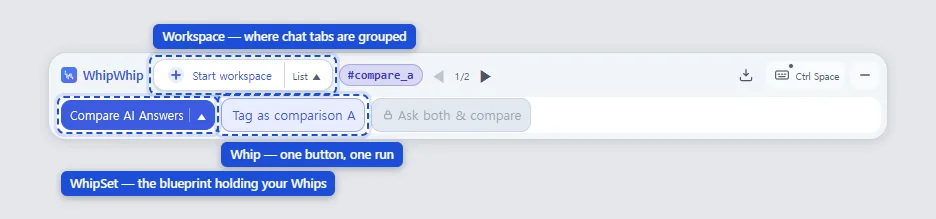 - **Whip** — the button you just pressed. It runs the prompt steps you set, in order.
- **WhipSet** — a bundle of several Whips. The panel shows one bundle at a time, and this is
also what you hand to someone else.
- **Workspace** — where conversation tabs are grouped. The chats you tagged are in here.
### Running across tabs is the normal shape
One button runs across several chatbot tabs; running inside a single tab is the shortened form.
You might have GPT's answer reviewed by Claude, or ask three bots the same question and compare.
The extension absorbs the differences between each site's markup. One capability does differ:
a Whip that uses **temporary chat** runs that step on ChatGPT and Gemini, and skips it
automatically on Claude, Grok, and Perplexity. Everything else works the same on all five.
## How you build
You stack action cards in the **builder**. If you would rather not pick cards yourself, copy the instructions on [Build with a chat](https://whipwhip.center/en/make) and let the chat you already use write the set. The sidebar has three sections — **Actions** (the
palette you stack from) · **Tags** (names you give conversations) · **Variables** (values captured
during a run).
A tag is the **role** that conversation plays. Naming it also decides what that conversation is
there to do.
- **Whip** — the button you just pressed. It runs the prompt steps you set, in order.
- **WhipSet** — a bundle of several Whips. The panel shows one bundle at a time, and this is
also what you hand to someone else.
- **Workspace** — where conversation tabs are grouped. The chats you tagged are in here.
### Running across tabs is the normal shape
One button runs across several chatbot tabs; running inside a single tab is the shortened form.
You might have GPT's answer reviewed by Claude, or ask three bots the same question and compare.
The extension absorbs the differences between each site's markup. One capability does differ:
a Whip that uses **temporary chat** runs that step on ChatGPT and Gemini, and skips it
automatically on Claude, Grok, and Perplexity. Everything else works the same on all five.
## How you build
You stack action cards in the **builder**. If you would rather not pick cards yourself, copy the instructions on [Build with a chat](https://whipwhip.center/en/make) and let the chat you already use write the set. The sidebar has three sections — **Actions** (the
palette you stack from) · **Tags** (names you give conversations) · **Variables** (values captured
during a run).
A tag is the **role** that conversation plays. Naming it also decides what that conversation is
there to do.
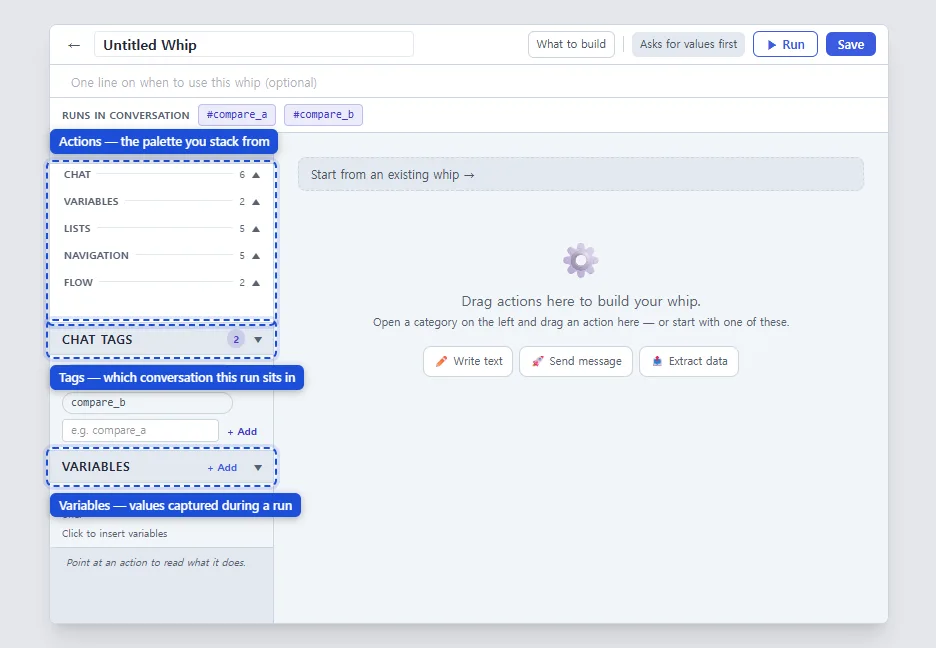 ### Find the card by what you want to do — 19 of them
The table's groups **are the palette's groups**, so what you pick in the table you find on
screen under the same name.
| What you want | In the palette group |
|---|---|
| Write a prompt and send it | **Chat** — write · send · ask me when the run starts |
| Read the reply and use it later | **Chat** — capture the reply · pull out just the part you want · wait for the answer |
| Ask again when the shape is off | **Chat** — check it and ask for a fix |
| Ask several AIs the same thing | **Chat** — send to several AIs (answers gathered in one place) |
| Put one value down | **Variables** — set a value |
| Collect and edit many items | **Lists** — add · update · patch · remove · filter |
| Go to another tab or chat | **Navigation** — one card per destination, split by the palette |
| Name the current conversation | **Navigation** — tag this chat |
| Let someone choose mid-run | **Flow** — offer a choice |
| Show a result | **Flow** — open a result window |
| Bring in a whipset a chat wrote | **Flow** — import a whipset (you confirm it in a preview first) |
These nineteen are everything you can build. That is also why **nothing outside those
nineteen can arrive inside a WhipSet someone sends you.**
### Where a variable's value comes from
| Where it comes from | When | Example |
|---|---|---|
| You type it | Asked when the run starts | topic · audience |
| Captured from a reply | Read out of the answer into a variable | `{{var.answer}}` |
| Fixed ahead of time | Baked into the set | a tone instruction |
| From another variable | Copied by name | draft → for review |
| Filled by the extension | Date, time, weekday, timestamp, UUID, language | `{{var.today}}` |
## Worth knowing
### Sharing
**Lock** a WhipSet and export it, and you get one long string. Locking comes first so that what
you sent cannot quietly drift from what you kept editing. It is a string, not an upload, so it
travels anywhere you can paste. On the receiving side, open the WhipSet list and paste it into
**📥 Import**: a preview comes first, so you see what is arriving before you accept it.
The extension filters on the way in. Actions you could not have built yourself, unsafe values,
tag names that break the rules — if something trips it, it says why and does not accept the set.
**This site is one end of that exchange.** What [Recipes](https://whipwhip.center/en/b/sets) carries is that
same string, and if you have the extension the new-post page can fill a set in for you, so you
never copy the string by hand. Edit a set you published and post it again, and everyone who
took it sees an update waiting in their extension.
### Limits
- **There are no accounts.** The Whips and settings you build stay in this browser and do not
show up on your other devices.
- **Your conversations do not leave the browser.** The extension's only outbound request reads a
post from the Recipes board — a post id goes out, no credentials and no conversation data.
- **Only the five supported sites.** This is not a macro tool that runs anywhere.
- When a chat site changes its UI things can be off for a while, and only the affected service
is impacted.
The [FAQ](https://whipwhip.center/en/faq) answers accounts, storage, and collection in more detail.
---
Source: https://whipwhip.center/en/faq
## Do I need an account?
The extension requires no account and has no backend server. Reading this site needs no login
either. **Writing a post on the boards does require a Google sign-in.**
## Where do my conversations go?
Nowhere. Your conversations never leave the browser — the extension transmits no prompts, replies,
or page content. Its only outbound request reads a post from the Recipes board (a post id, no
credentials, no conversation data). The Whips and settings you build stay in this browser.
The developers never receive, see, or store your data. Details are in
the [Privacy Policy](https://whipwhip.center/en/legal/privacy).
## Which sites does it work on?
ChatGPT, Claude, Gemini, Grok, and Perplexity. The extension does not run anywhere else, and it
does not read your other tabs.
## Which browser do I need?
A **desktop** Chromium browser — Chrome or Edge. The panel sits on top of the chat page and works
across several tabs, so it does not run on mobile browsers, which have no extensions. Firefox and
Safari are not supported.
## Does it cost anything?
It is free, and there are no plans to monetize it.
## How do I give a Whip to someone else?
Lock a WhipSet, export it, and you get a long string starting with `ww2.`. It is a string rather
than an upload, so it travels anywhere you can paste. The recipient opens the WhipSet list, pastes
it into **📥 Import**, and sees a preview of what is arriving before accepting it.
## Is a string someone sent me safe?
The receiving side checks it, and this site checks it again. A set that tries to smuggle code in
as a value does not get through. You are also always shown the contents first — there is no path
that accepts something you have not seen.
## What if a chat site changes its UI?
Usually the extension absorbs it. A large change can throw things off for a while, and when it
does only the affected service is impacted. There is nothing for you to do but wait for the
extension to catch up.
## Is a tag just a label?
A tag is the **role** that conversation plays. Naming it also decides what that conversation is
there to do.
## What happens to my Whips if I switch browsers or remove the extension?
Removing the extension removes them, and they do not follow you to another browser. Use the
export in Settings to keep a backup.
---
Source: https://whipwhip.center/en/guidelines
What we ask of you when posting to the [recipes board](https://whipwhip.center/b/sets).
These are house rules, not legal notices — the [terms](https://whipwhip.center/legal/tos) and
[privacy policy](https://whipwhip.center/legal/privacy) live separately.
## What gets taken down
- Sets built to harm or deceive
- Posts that are only promotion, with nothing usable in them
- The same thing posted repeatedly
Rather than deleting, we **hide** the post from the listing. One person makes that call today,
and there is no public log of what was hidden.
## Posting someone else's set
Post a share string as you received it and the signature inside stays **the original author's** —
the `Signing key` on the set page shows it. Once you edit a set into your own, the signature
becomes yours and the root it came from is recorded under `Forked from`.
If the original author would not want it posted, please don't. We have no way to know.
## What this site does not check
We **do not run** the sets that get posted. Three things we therefore cannot vouch for:
- Whether the set actually works
- Whether an attached sample output really came from that set
- What answers the prompts inside will produce
What we do show is **everything that is in it** — the reader on each set page lays out the steps,
variables, tags, and every outbound address. Please read that before taking it.
---
Source: https://whipwhip.center/en/make
# Build a WhipWhip whipset for me
You are going to design a **whipset** for WhipWhip and write it as one JSON object. Read this whole
guide first. At the very end, after "My request", I describe what I want. Ask me at most one
short question if something essential is missing; otherwise answer with the JSON right away.
## What WhipWhip is
WhipWhip is a browser extension. It puts a panel on top of the web chat I use (ChatGPT, Claude,
Gemini, Grok or Perplexity) and runs saved procedures in that chat for me: it types into the chat
input box, sends, waits for the answer, reads the answer, stores parts of it, and shows results.
- A **whipset** is a named collection of whips. It is what you are writing.
- A **whip** is one button. Pressing it runs its **cards** from top to bottom.
- A **card** is one step: write a prompt, send, save the reply into a variable, ask me something,
move to another conversation, show a result, and so on. Every card has a `card` id and a `config`.
- A **variable** is a named value the whips of this set share. Values survive between runs, so one
whip can store something that another whip reads later.
- A **tag** is a role: a name for one specific conversation (for example `writer` or `critic`).
Whips can put the current conversation into a role and later move back to it. That is how one
whip passes work between two separate chats.
WhipWhip does not call any API. Everything happens in the real chat page, exactly as if I typed it.
So a whip can only do what a person could do in that page, one card at a time.
## How the cards fit together
**Talking to the chat.** `prompt_write` puts text into the input box (it does not send).
`submit` sends it and waits until the answer is complete. After `submit`, the answer is available.
**Keeping the answer.** `var_save` with `"valueSource": "var.last.assistant"` stores the whole
latest answer in a variable. That is the normal way to keep a result. `ask_and_extract` is for
pulling **short named values** out of an answer (a title, a score, a tag) — it adds an instruction
to the prompt asking the model to append tagged values, then reads them. Do not use it to capture a
whole long answer. `extract_response` asks for structured JSON in a separate temporary tab; use it
rarely. `validate` checks that the latest answer has a format (JSON, a regex, or simply not empty)
and asks the chat again if it does not.
**Asking me.** Two ways:
1. Put a `user_input` variable into a prompt as a token. Before the whip runs, WhipWhip shows me a
small form for every `user_input` variable the whip needs. This is the default and usually best.
2. `input_prompt` asks me in the middle of a run, right where the card is. Use it when the question
only makes sense at that moment (for example "name this clipping" after reading an answer), or
with `"alwaysAsk": true` to confirm a value that is already filled in.
`choice_prompt` lets me pick from options — a fixed list (one option per line in `options`) or the
items of a list variable.
**Showing results.** `show_result_modal` opens a window with text built from variables. Use
`"copyButton": "copy_body"` when I will probably copy it.
**Moving between conversations.** `new_chat` opens a fresh conversation on the same service.
`open_service` goes to another service. `open_url` opens an address. `tag_current_chat` gives the
conversation the run is standing in a role. `go_to_role` moves the run to the conversation holding
that role. A role must be given (`tag_current_chat`) before any whip can go to it (`go_to_role`),
so a two-role set usually has one short "start" whip per role that primes the chat and tags it:
`prompt_write` (who you are in this conversation) → `submit` → `tag_current_chat`.
**Lists.** A variable with `"valueType": "array"` holds a list of records. `append_item` adds a
record (`fields` is a list of name/value pairs, and `autoId` gives each record an `id`),
`upsert_item` adds or replaces by `id`, `patch_item` changes some fields of one record,
`remove_item` deletes one. `derive_index` turns a list into text (one line per item, from a
template with `<>` tokens) and stores that text in another variable, so a prompt or a
result window can show it. Lists are how a set remembers things across many runs (a notebook, a
library, a log).
**Variables.**
- `source: "user_input"` — I provide it (form before the run, or `input_prompt`).
- `source: "set_by_action"` — a card writes it: `var_save`, `input_prompt`, `choice_prompt`,
`ask_and_extract`, `extract_response`, `validate` (its `variable`), `derive_index` and the list cards.
- `source: "constant"` — a fixed text in `defaultValue`.
- Keys use only letters, digits and `_`. Labels are what I see, so write them in my language.
- Every variable a card uses must be declared in `variables`.
## Tokens
Inside card text, a variable is written as **`<>`** — two angle brackets on each side.
Inside a list template it is `<>`. `<>` is today's date.
**Never write tokens with curly braces.** WhipWhip converts `<<…>>` itself.
## The JSON shape
```text
{
"format": "whipwhip.authoring/1",
"name": "…", set name, in my language
"description": "…", optional, one sentence
"inline_guide": "…", optional, how to use the set
"tags": [ { "name": "writer" } ], roles; 3–10 characters of A–Z a–z 0–9 _ -
"variables": [ { "key": "…", "label": "…", "source": "…", "required": true } ],
"whips": [
{
"label": "…", button text, short
"description": "…", optional
"preflightStyle": "form", optional: "form" (default) or "none"
"scopeTags": [ "writer" ], optional: the role conversation this whip belongs to
"actions": [ { "card": "prompt_write", "config": { "text": "…" } } ]
}
]
}
```
Do **not** write ids, `usedVars`, `requiresVars`, `producesVars`, `askInline`, keys, signatures or
versions. WhipWhip fills those in.
## Card reference
### `prompt_write`
Write or modify text in the chat window.
- `text` — text, **required**, accepts <> tokens
- `mode` — one of `replace` · `append` · `prepend`
- `preflight` — true or false. Show an input form for <> tokens in this prompt before executing
- `inputStyle` — one of `form` · `inline`, used when: `preflight` = `true`
### `submit`
Send the current text, and wait for the AI's reply unless you turn waiting off.
- `skipWait` — true or false. Move on right after sending. Use this when the whip never reads the reply — e.g. broadcasting the same prompt to several tabs.
### `input_prompt`
Ask the user to provide necessary information.
- `title` — text
- `selectedVars` — `[{ "key": …, "question": … }]`, **required**
- `inputStyle` — one of `form` · `inline`
- `alwaysAsk` — true or false. Show this input even when the variable already has a value, so a pre-filled or LLM-drafted value can be reviewed before it is committed
### `ask_and_extract`
Prompt the AI and extract key information as variables automatically.
- `text` — text, **required**, accepts <> tokens
- `preflight` — true or false. Show an input form for <> tokens in this prompt before executing
- `inputStyle` — one of `form` · `inline`, used when: `preflight` = `true`
- `varsToExtract` — `[{ "key": …, "description": … }]`, **required**
### `extract_response`
Analyze the AI response and convert it into structured data. Opens a temporary tab in the foreground while it works.
- `key` — variable key, **required**. The variable name to store the captured value in.
- `schema` — text, **required**. Describe the shape of the JSON you expect the AI to return.
- `promptSuffix` — text. Optional extra text appended to the extraction prompt.
- `retries` — number. How many times to re-ask if the response is not valid JSON.
### `validate`
Check the reply against a FORMAT rule and re-ask if it does not match. Format only, never quality.
- `source` — one of `last_assistant` · `var`. The last reply, or a stored variable. A variable is checked only — re-asking cannot change a past value.
- `key` — variable key, used when: `source` = `var`
- `rule` — one of `json` · `regex` · `non_empty` · `whipset`, **required**. JSON: parses (optionally with required keys). Regex: matches a pattern. Not empty: any non-blank reply. Whipset: a WhipWhip whipset written by the chat — if it is wrong, the re-ask carries the list of fixes.
- `pattern` — text, used when: `rule` = `regex`
- `requiredKeys` — text, used when: `rule` = `json`. Comma-separated top-level keys that must exist.
- `retries` — number. How many times to send a correction prompt before failing. 0 = check only.
- `correction` — text. Sent when the format does not match. Leave empty for a default message.
- `variable` — variable key
### `send_to_services`
Send the same text to the chosen AIs and gather every answer in one variable. Other AIs open in background tabs.
- `servicesVar` — variable key, **required**. Variable holding a JSON array of AI service ids. Usually filled by a Choice with the "AI services" source and multiple selection.
- `text` — text, **required**, accepts <> tokens. Sent unchanged to every AI. Variable tokens are allowed.
- `tagPrefix` — text. When set, each AI's chat is tagged "name_abbr" (gpt, gem, cla, grk, ppx) so the next run can follow up. Up to 6 characters.
- `key` — variable key, **required**. Gets a heading and the answer (or why it failed) for each AI.
### `var_save`
Save text from the composer or AI response into a variable.
- `valueSource` — one of the value sources below, or `var.`, **required**. Where to read the value from.
- `key` — variable key, **required**. The variable name to store the captured value in.
- `valueFilter` — one of `""` · `code`, used depending on `valueSource`
### `var_flush`
Clear all stored variable values.
No settings — use `"config": {}`.
### `append_item`
Add an item to an array variable (e.g. append a record to an ADR list).
- `key` — variable key, **required**. An array-typed variable to mutate. Set the variable's type to "array" first.
- `fields` — `[{ "name": …, "value": … }]`, **required**, accepts <> tokens. Fields of the record to append (name → value). Values may use <> tokens; quotes and newlines are handled for you.
- `autoId` — true or false. Give each new item a stable, incrementing id when you don't supply one yourself.
- `idPrefix` — text, used when: `autoId` = `true`. Prepended to the number, e.g. "adr-" produces adr-1, adr-2, …
### `upsert_item`
Insert or update an item in an array variable, matched by its "id" field.
- `key` — variable key, **required**. An array-typed variable to mutate. Set the variable's type to "array" first.
- `fields` — `[{ "name": …, "value": … }]`, **required**, accepts <> tokens. Fields of the record to insert or update. Include an "id" field — it matches the existing item to replace.
### `patch_item`
Update only the named fields of an item matched by id, keeping its other fields (e.g. flip status).
- `key` — variable key, **required**. An array-typed variable to mutate. Set the variable's type to "array" first.
- `itemId` — text, **required**, accepts <> tokens. The "id" of the item to patch. Supports <> tokens.
- `fields` — `[{ "name": …, "value": … }]`, **required**, accepts <> tokens. Only these fields are updated; the item's other fields are kept. Values may use <> tokens.
### `remove_item`
Remove an item from an array variable by its "id".
- `key` — variable key, **required**. An array-typed variable to mutate. Set the variable's type to "array" first.
- `itemId` — text, **required**, accepts <> tokens. The "id" of the item to remove. Supports <> tokens.
### `derive_index`
Build a summary/index string from an array variable, one line per item.
- `sourceKey` — variable key, **required**. The array variable to summarize.
- `key` — variable key, **required**. The variable that receives the derived index string.
- `mode` — one of `join` · `count`. Index text (default), or just how many items are left after filtering.
- `itemTemplate` — text, required when used, accepts <> tokens, used depending on `mode`. Rendered once per item and joined by newline. Use <> tokens, e.g. <> — <>.
- `filterField` — text. Keep only items matching the value below. Leave blank to include all.
- `filterOp` — one of `eq` · `ne`, used depending on `filterField`. A missing field counts as an empty value either way.
- `filterValue` — text, accepts <> tokens, used depending on `filterField`. The value the filter field is compared against. Supports <> tokens.
- `sortField` — text. Order items by this field before rendering. Numeric-aware, so adr-2 comes before adr-10. Leave blank to keep insertion order.
- `sortDir` — one of `asc` · `desc`, used depending on `sortField`
- `limit` — number. Keep at most this many items. Leave blank for all.
- `limitFrom` — one of `end` · `start`, used depending on `limit`
### `go_to_role`
Move the run to the conversation a role is bound to.
- `tagName` — tag name
- `tagCandidates` — list of tag names. Pick the roles this step may route to. Leave empty for fixed routing. The run is refused unless every candidate is bound.
- `tagVar` — variable key. Variable holding the chosen role name (e.g. filled by a Choice step). Only used when candidates are picked.
### `new_chat`
Open a new conversation on the current service.
- `isTemp` — one of `false` · `true`
- `openMode` — one of `current` · `new_tab` · `background`
### `open_service`
Switch to a different AI service (ChatGPT, Gemini, Claude…).
- `service` — one of `chatgpt` · `gemini` · `claude` · `grok` · `perplexity`
- `openMode` — one of `current` · `new_tab` · `background`
### `open_url`
Navigate to any https:// URL.
- `target` — text
- `openMode` — one of `current` · `new_tab` · `background`
### `tag_current_chat`
Assign a tag to the current conversation.
- `tagName` — tag name, **required**
### `choice_prompt`
Show the user a list of options and store their pick in a variable.
- `label` — text
- `optionsSource` — one of `static` · `variable` · `services`. Where to get the choice options from. "AI services" fills in ChatGPT, Claude, Gemini, Grok and Perplexity.
- `options` — text, required when used, used depending on `optionsSource`. Each line becomes a button. Saved to variable as the chosen line.
- `dynamicOptionsVar` — variable key, required when used, used when: `optionsSource` = `variable`. Variable containing options (one per line). Parsed at runtime.
- `optionLabel` — text, accepts <> tokens, used when: `optionsSource` = `variable`. Per-item label template for each choice. Use <> tokens, e.g. <> — <>.
- `optionValueField` — text, used when: `optionsSource` = `variable`. Which item field becomes the picked value (default "id"). Feed it to a later Patch list item or Remove from list step as the item id.
- `multiple` — true or false. Show a checklist; on OK the checked values are saved as a JSON array.
- `lockCurrentService` — true or false, used when: `optionsSource` = `services`. With multiple selection, mark the AI of the tab that ran the whip as "current tab" and keep it checked and locked.
- `warnInConversation` — true or false, used when: `optionsSource` = `services`. With multiple selection, note above the checklist when the running tab already has a conversation, since only its AI answers with that context.
- `continueGroup` — text, used when: `optionsSource` = `services`. With multiple selection, when the running tab belongs to the "name_abbr" tag group, add a "Follow up" row on top (on by default) and pre-check those AIs. Match the tag name in "Send to several AIs".
- `rememberAs` — text, used when: `multiple` = `true`. Give a name to remember this pick and pre-check it next run. The same memory is used from any tab or workspace.
- `key` — variable key, **required**. Variable key where the chosen option will be stored.
### `show_result_modal`
Display a result window using stored variable values.
- `title` — text
- `body` — text, **required**
- `copyButton` — one of `none` · `copy_body`
### `import_whipset`
Import a chat-written whipset JSON held in a variable. You confirm it in a preview before anything is saved.
- `key` — variable key, **required**. Usually the variable a preceding Validate card (whipset rule) stored.
**Value sources (`var_save.valueSource`)**
`builtin.date_today` · `builtin.date_iso` · `builtin.time_now` · `builtin.timestamp` · `builtin.day_of_week` · `builtin.page_url` · `builtin.page_title` · `builtin.page_domain` · `builtin.language` · `builtin.random_uuid` · `builtin.selection` · `composer` · `var.last.user` · `var.last.assistant`
## Common mistakes
- Writing tokens with curly braces instead of `<>`.
- A `set_by_action` variable that no card writes, or a variable used in text but not declared.
- Reading the answer (`var_save` with `var.last.assistant`) without a `submit` before it.
- Forgetting `submit` after `prompt_write` when the prompt should actually be sent.
- A list card on a variable without `"valueType": "array"`.
- `go_to_role` to a role that no whip ever gives with `tag_current_chat`, or a tag not declared in `tags`.
- A tag name longer than 10 characters, with spaces, or named `main`.
- Setting fields that do not exist on a card, or inventing card ids.
- Using `ask_and_extract` to capture a long answer — use `var_save` with `var.last.assistant`.
- One giant whip that does everything. Prefer a few whips with clear buttons.
## Examples
### One conversation: polish a draft and show it
```json
{
"format": "whipwhip.authoring/1",
"name": "Draft Polisher",
"description": "Rewrite a rough draft clearly and show the result.",
"tags": [],
"variables": [
{ "key": "draft", "label": "Draft", "source": "user_input", "required": true },
{ "key": "polished", "label": "Polished text", "source": "set_by_action", "required": false }
],
"whips": [
{
"label": "Polish",
"actions": [
{ "card": "prompt_write", "config": { "text": "Rewrite the draft below so it is clear and concise. Keep my meaning and tone. Reply with the rewritten text only.\n\n<>", "mode": "replace" } },
{ "card": "submit", "config": {} },
{ "card": "var_save", "config": { "valueSource": "var.last.assistant", "key": "polished" } },
{ "card": "show_result_modal", "config": { "title": "Polished", "body": "<>", "copyButton": "copy_body" } }
]
}
]
}
```
### Two roles: a writer and a critic in separate chats
```json
{
"format": "whipwhip.authoring/1",
"name": "Writer and Critic",
"inline_guide": "Open a chat and press Start writer, open another chat and press Start critic. Then run Write and review from anywhere.",
"tags": [ { "name": "writer" }, { "name": "critic" } ],
"variables": [
{ "key": "task", "label": "What to write", "source": "user_input", "required": true },
{ "key": "draft", "label": "Draft", "source": "set_by_action", "required": false },
{ "key": "review", "label": "Review", "source": "set_by_action", "required": false },
{ "key": "final", "label": "Final", "source": "set_by_action", "required": false }
],
"whips": [
{
"label": "Start writer",
"actions": [
{ "card": "prompt_write", "config": { "text": "In this conversation you are my writer. You write complete drafts and revise them when I bring criticism. Reply OK.", "mode": "replace" } },
{ "card": "submit", "config": {} },
{ "card": "tag_current_chat", "config": { "tagName": "writer" } }
]
},
{
"label": "Start critic",
"actions": [
{ "card": "prompt_write", "config": { "text": "In this conversation you are a demanding critic. When I show you a draft, list its weakest points as short numbered items. Reply OK.", "mode": "replace" } },
{ "card": "submit", "config": {} },
{ "card": "tag_current_chat", "config": { "tagName": "critic" } }
]
},
{
"label": "Write and review",
"actions": [
{ "card": "go_to_role", "config": { "tagName": "writer" } },
{ "card": "prompt_write", "config": { "text": "<>", "mode": "replace" } },
{ "card": "submit", "config": {} },
{ "card": "var_save", "config": { "valueSource": "var.last.assistant", "key": "draft" } },
{ "card": "go_to_role", "config": { "tagName": "critic" } },
{ "card": "prompt_write", "config": { "text": "Task: <>\n\nDraft:\n<>", "mode": "replace" } },
{ "card": "submit", "config": {} },
{ "card": "var_save", "config": { "valueSource": "var.last.assistant", "key": "review" } },
{ "card": "go_to_role", "config": { "tagName": "writer" } },
{ "card": "prompt_write", "config": { "text": "Revise your draft using this criticism. Output the full revised version.\n\n<>", "mode": "replace" } },
{ "card": "submit", "config": {} },
{ "card": "var_save", "config": { "valueSource": "var.last.assistant", "key": "final" } },
{ "card": "show_result_modal", "config": { "title": "Draft, review, final", "body": "[Draft]\n<>\n\n[Review]\n<>\n\n[Final]\n<>", "copyButton": "copy_body" } }
]
}
]
}
```
### A list that grows: a notebook of answers
```json
{
"format": "whipwhip.authoring/1",
"name": "Answer Notebook",
"tags": [],
"variables": [
{ "key": "clip", "label": "Clipped answer", "source": "set_by_action", "required": false },
{ "key": "clip_title", "label": "Title", "source": "set_by_action", "required": false },
{ "key": "notes", "label": "Notes", "source": "set_by_action", "valueType": "array", "required": false },
{ "key": "notes_index", "label": "Note list", "source": "set_by_action", "required": false },
{ "key": "notes_full", "label": "All notes", "source": "set_by_action", "required": false },
{ "key": "summary", "label": "Summary", "source": "set_by_action", "required": false }
],
"whips": [
{
"label": "Save this answer",
"actions": [
{ "card": "var_save", "config": { "valueSource": "var.last.assistant", "key": "clip" } },
{ "card": "input_prompt", "config": { "title": "Save this answer", "selectedVars": [ { "key": "clip_title", "question": "Give it a short title" } ], "inputStyle": "inline", "alwaysAsk": true } },
{ "card": "append_item", "config": { "key": "notes", "autoId": true, "idPrefix": "note-", "fields": [ { "name": "title", "value": "<>" }, { "name": "text", "value": "<>" }, { "name": "date", "value": "<>" } ] } },
{ "card": "derive_index", "config": { "sourceKey": "notes", "key": "notes_index", "itemTemplate": "<> — <> (<>)" } },
{ "card": "show_result_modal", "config": { "title": "Notes", "body": "<>" } }
]
},
{
"label": "Summarize my notes",
"actions": [
{ "card": "derive_index", "config": { "sourceKey": "notes", "key": "notes_full", "itemTemplate": "### <>\n<>" } },
{ "card": "new_chat", "config": { "openMode": "current" } },
{ "card": "prompt_write", "config": { "text": "Summarize what these notes have in common and what they add up to.\n\n<>", "mode": "replace" } },
{ "card": "submit", "config": {} },
{ "card": "var_save", "config": { "valueSource": "var.last.assistant", "key": "summary" } },
{ "card": "show_result_modal", "config": { "title": "Summary", "body": "<>", "copyButton": "copy_body" } }
]
}
]
}
```
## Output rules
1. Think about which whips I will press and in what order, then design the smallest set that works.
2. Write names, labels, questions, prompts and result titles in **the language I write my request in**.
Card ids, field names, variable keys and tag names stay as in this guide.
3. Answer with **one** JSON code block containing the whole whipset. You may add at most two short
sentences after the block telling me which button to press first.
4. If I paste back a list of problems from WhipWhip, fix every item and send the **complete**
corrected JSON again, not a partial patch.
## My request
---
Source: https://whipwhip.center/en/use/dinner-tonight
# What's for dinner — one chatbot run
You retype the same question every day. "I have this and this in the fridge, what can I cook?"
You get an answer, ask for the recipe, then copy whatever you are missing into a notes app.
The next day you do the whole thing again. WhipWhip freezes that sequence into **one button**.
## How the run goes
1. **You list the ingredients once.** Hitting run asks "what's in the fridge?" first — rough is
fine. That value flows into every question after it.
2. **You get meals you can actually make.** The step is told to pick only what the ingredients
support, so suggestions that quietly require a shopping trip get filtered out.
3. **You get the recipe for the one you picked.** No pasting the previous answer back in — the
reply you got is carried into the next question.
4. **What you're missing piles up in a shopping list.** You open that list when you go shopping.
This week's groceries and next week's menu know about each other.
## Why one chatbot alone isn't enough
It is enough — if you retype the same sentences, copy each answer into the next question, and
keep the shopping list somewhere else. That is three chores, every day. Removing exactly those
chores is what WhipWhip does. Name a conversation once and the next run comes back to the **same
conversation**, so the bot still has last week's dinners in front of it.
## What you need
A **desktop** Chromium browser — Chrome or Edge — and an account with a chatbot you already use.
WhipWhip is free and asks for no sign-up. Your conversations never leave your browser.
## How to take it
This workflow is on the [board](https://whipwhip.center/en/b/sets) as it is. Copy the one string in the post, paste it
into the extension's Settings → Import, and a preview comes up before anything is saved.
---
Source: https://whipwhip.center/en/use/explain-and-quiz
# Explain it, then quiz me — study loop
An explanation usually feels understood. Whether it was depends on answering questions about it,
and getting questions means asking the bot again, and keeping the ones you missed is yet another
job. When those three steps come apart, studying stops there. WhipWhip joins them into **one
sequence**.
## How the run goes
1. **You name what you don't know.** A concept, or a sentence you got stuck on.
2. **You get the explanation.** Set the level once and it arrives at that level every time.
3. **Five questions follow immediately.** They come out of that explanation, so you never get the
mismatch where the explanation was easy and the questions come from somewhere else.
4. **Only what you missed is kept.** What you got right passes; the weak spots stay. Later you
review just those.
## Why a single chat drifts
Ask about the same topic again and the bot has no idea what you got wrong last time. Name a
conversation once and any run comes back to **that conversation**, so the misses accumulate in
one place. What scatters is not the knowledge but the context, and holding the context is what
this sequence does.
## What you need
A **desktop** Chromium browser — Chrome or Edge — and an account with a chatbot you already use.
WhipWhip is free and asks for no sign-up. Your conversations never leave your browser.
## How to take it
This workflow is on the [board](https://whipwhip.center/en/b/sets). Copy the one string in the post and paste it into
the extension's Settings → Import — a preview comes up before anything is saved.
---
Source: https://whipwhip.center/en/use/fact-check
# Is this actually true — ask three bots
Ask one chatbot about something you read and you get one answer. To check it you open another
tab, retype the same sentence, and compare the two by eye. WhipWhip folds that round trip into
**one run**.
## How the run goes
1. **You paste the claim once.** A link, or something you were told — as it is.
2. **It goes to three services at the same time.** Perplexity, ChatGPT and Claude each get the
same question in their own tab. Because the wording is identical, the difference between the
answers is only the **difference between the models**.
3. **The answers land on one screen.** You read them next to each other.
4. **Disagreement is the signal.** When all three point the same way it is usually safe; when one
goes its own way, that is where to dig. You are reading **where they disagree**, not how
confident any one of them sounds.
## Why one source is hard to trust
A chatbot leans toward filling a gap plausibly rather than saying it does not know, and that
failure is hard to see from inside a single model — asked to review its own answer, it usually
passes it. Give the same question to three different models and the failure shows up as
disagreement. Handing one bot's answer to another for review is the same idea, and WhipWhip does
the handing as a step instead of by hand.
## What you need
A **desktop** Chromium browser — Chrome or Edge — and a login for the services you want to use.
You don't need all three; it works the same way with whichever you have. WhipWhip is free and
asks for no sign-up. Your conversations never leave your browser.
## How to take it
This workflow is on the [board](https://whipwhip.center/en/b/sets). Copy the one string in the post and paste it into
the extension's Settings → Import — a preview comes up first.
### Find the card by what you want to do — 19 of them
The table's groups **are the palette's groups**, so what you pick in the table you find on
screen under the same name.
| What you want | In the palette group |
|---|---|
| Write a prompt and send it | **Chat** — write · send · ask me when the run starts |
| Read the reply and use it later | **Chat** — capture the reply · pull out just the part you want · wait for the answer |
| Ask again when the shape is off | **Chat** — check it and ask for a fix |
| Ask several AIs the same thing | **Chat** — send to several AIs (answers gathered in one place) |
| Put one value down | **Variables** — set a value |
| Collect and edit many items | **Lists** — add · update · patch · remove · filter |
| Go to another tab or chat | **Navigation** — one card per destination, split by the palette |
| Name the current conversation | **Navigation** — tag this chat |
| Let someone choose mid-run | **Flow** — offer a choice |
| Show a result | **Flow** — open a result window |
| Bring in a whipset a chat wrote | **Flow** — import a whipset (you confirm it in a preview first) |
These nineteen are everything you can build. That is also why **nothing outside those
nineteen can arrive inside a WhipSet someone sends you.**
### Where a variable's value comes from
| Where it comes from | When | Example |
|---|---|---|
| You type it | Asked when the run starts | topic · audience |
| Captured from a reply | Read out of the answer into a variable | `{{var.answer}}` |
| Fixed ahead of time | Baked into the set | a tone instruction |
| From another variable | Copied by name | draft → for review |
| Filled by the extension | Date, time, weekday, timestamp, UUID, language | `{{var.today}}` |
## Worth knowing
### Sharing
**Lock** a WhipSet and export it, and you get one long string. Locking comes first so that what
you sent cannot quietly drift from what you kept editing. It is a string, not an upload, so it
travels anywhere you can paste. On the receiving side, open the WhipSet list and paste it into
**📥 Import**: a preview comes first, so you see what is arriving before you accept it.
The extension filters on the way in. Actions you could not have built yourself, unsafe values,
tag names that break the rules — if something trips it, it says why and does not accept the set.
**This site is one end of that exchange.** What [Recipes](https://whipwhip.center/en/b/sets) carries is that
same string, and if you have the extension the new-post page can fill a set in for you, so you
never copy the string by hand. Edit a set you published and post it again, and everyone who
took it sees an update waiting in their extension.
### Limits
- **There are no accounts.** The Whips and settings you build stay in this browser and do not
show up on your other devices.
- **Your conversations do not leave the browser.** The extension's only outbound request reads a
post from the Recipes board — a post id goes out, no credentials and no conversation data.
- **Only the five supported sites.** This is not a macro tool that runs anywhere.
- When a chat site changes its UI things can be off for a while, and only the affected service
is impacted.
The [FAQ](https://whipwhip.center/en/faq) answers accounts, storage, and collection in more detail.
---
Source: https://whipwhip.center/en/faq
## Do I need an account?
The extension requires no account and has no backend server. Reading this site needs no login
either. **Writing a post on the boards does require a Google sign-in.**
## Where do my conversations go?
Nowhere. Your conversations never leave the browser — the extension transmits no prompts, replies,
or page content. Its only outbound request reads a post from the Recipes board (a post id, no
credentials, no conversation data). The Whips and settings you build stay in this browser.
The developers never receive, see, or store your data. Details are in
the [Privacy Policy](https://whipwhip.center/en/legal/privacy).
## Which sites does it work on?
ChatGPT, Claude, Gemini, Grok, and Perplexity. The extension does not run anywhere else, and it
does not read your other tabs.
## Which browser do I need?
A **desktop** Chromium browser — Chrome or Edge. The panel sits on top of the chat page and works
across several tabs, so it does not run on mobile browsers, which have no extensions. Firefox and
Safari are not supported.
## Does it cost anything?
It is free, and there are no plans to monetize it.
## How do I give a Whip to someone else?
Lock a WhipSet, export it, and you get a long string starting with `ww2.`. It is a string rather
than an upload, so it travels anywhere you can paste. The recipient opens the WhipSet list, pastes
it into **📥 Import**, and sees a preview of what is arriving before accepting it.
## Is a string someone sent me safe?
The receiving side checks it, and this site checks it again. A set that tries to smuggle code in
as a value does not get through. You are also always shown the contents first — there is no path
that accepts something you have not seen.
## What if a chat site changes its UI?
Usually the extension absorbs it. A large change can throw things off for a while, and when it
does only the affected service is impacted. There is nothing for you to do but wait for the
extension to catch up.
## Is a tag just a label?
A tag is the **role** that conversation plays. Naming it also decides what that conversation is
there to do.
## What happens to my Whips if I switch browsers or remove the extension?
Removing the extension removes them, and they do not follow you to another browser. Use the
export in Settings to keep a backup.
---
Source: https://whipwhip.center/en/guidelines
What we ask of you when posting to the [recipes board](https://whipwhip.center/b/sets).
These are house rules, not legal notices — the [terms](https://whipwhip.center/legal/tos) and
[privacy policy](https://whipwhip.center/legal/privacy) live separately.
## What gets taken down
- Sets built to harm or deceive
- Posts that are only promotion, with nothing usable in them
- The same thing posted repeatedly
Rather than deleting, we **hide** the post from the listing. One person makes that call today,
and there is no public log of what was hidden.
## Posting someone else's set
Post a share string as you received it and the signature inside stays **the original author's** —
the `Signing key` on the set page shows it. Once you edit a set into your own, the signature
becomes yours and the root it came from is recorded under `Forked from`.
If the original author would not want it posted, please don't. We have no way to know.
## What this site does not check
We **do not run** the sets that get posted. Three things we therefore cannot vouch for:
- Whether the set actually works
- Whether an attached sample output really came from that set
- What answers the prompts inside will produce
What we do show is **everything that is in it** — the reader on each set page lays out the steps,
variables, tags, and every outbound address. Please read that before taking it.
---
Source: https://whipwhip.center/en/make
# Build a WhipWhip whipset for me
You are going to design a **whipset** for WhipWhip and write it as one JSON object. Read this whole
guide first. At the very end, after "My request", I describe what I want. Ask me at most one
short question if something essential is missing; otherwise answer with the JSON right away.
## What WhipWhip is
WhipWhip is a browser extension. It puts a panel on top of the web chat I use (ChatGPT, Claude,
Gemini, Grok or Perplexity) and runs saved procedures in that chat for me: it types into the chat
input box, sends, waits for the answer, reads the answer, stores parts of it, and shows results.
- A **whipset** is a named collection of whips. It is what you are writing.
- A **whip** is one button. Pressing it runs its **cards** from top to bottom.
- A **card** is one step: write a prompt, send, save the reply into a variable, ask me something,
move to another conversation, show a result, and so on. Every card has a `card` id and a `config`.
- A **variable** is a named value the whips of this set share. Values survive between runs, so one
whip can store something that another whip reads later.
- A **tag** is a role: a name for one specific conversation (for example `writer` or `critic`).
Whips can put the current conversation into a role and later move back to it. That is how one
whip passes work between two separate chats.
WhipWhip does not call any API. Everything happens in the real chat page, exactly as if I typed it.
So a whip can only do what a person could do in that page, one card at a time.
## How the cards fit together
**Talking to the chat.** `prompt_write` puts text into the input box (it does not send).
`submit` sends it and waits until the answer is complete. After `submit`, the answer is available.
**Keeping the answer.** `var_save` with `"valueSource": "var.last.assistant"` stores the whole
latest answer in a variable. That is the normal way to keep a result. `ask_and_extract` is for
pulling **short named values** out of an answer (a title, a score, a tag) — it adds an instruction
to the prompt asking the model to append tagged values, then reads them. Do not use it to capture a
whole long answer. `extract_response` asks for structured JSON in a separate temporary tab; use it
rarely. `validate` checks that the latest answer has a format (JSON, a regex, or simply not empty)
and asks the chat again if it does not.
**Asking me.** Two ways:
1. Put a `user_input` variable into a prompt as a token. Before the whip runs, WhipWhip shows me a
small form for every `user_input` variable the whip needs. This is the default and usually best.
2. `input_prompt` asks me in the middle of a run, right where the card is. Use it when the question
only makes sense at that moment (for example "name this clipping" after reading an answer), or
with `"alwaysAsk": true` to confirm a value that is already filled in.
`choice_prompt` lets me pick from options — a fixed list (one option per line in `options`) or the
items of a list variable.
**Showing results.** `show_result_modal` opens a window with text built from variables. Use
`"copyButton": "copy_body"` when I will probably copy it.
**Moving between conversations.** `new_chat` opens a fresh conversation on the same service.
`open_service` goes to another service. `open_url` opens an address. `tag_current_chat` gives the
conversation the run is standing in a role. `go_to_role` moves the run to the conversation holding
that role. A role must be given (`tag_current_chat`) before any whip can go to it (`go_to_role`),
so a two-role set usually has one short "start" whip per role that primes the chat and tags it:
`prompt_write` (who you are in this conversation) → `submit` → `tag_current_chat`.
**Lists.** A variable with `"valueType": "array"` holds a list of records. `append_item` adds a
record (`fields` is a list of name/value pairs, and `autoId` gives each record an `id`),
`upsert_item` adds or replaces by `id`, `patch_item` changes some fields of one record,
`remove_item` deletes one. `derive_index` turns a list into text (one line per item, from a
template with `<>` tokens) and stores that text in another variable, so a prompt or a
result window can show it. Lists are how a set remembers things across many runs (a notebook, a
library, a log).
**Variables.**
- `source: "user_input"` — I provide it (form before the run, or `input_prompt`).
- `source: "set_by_action"` — a card writes it: `var_save`, `input_prompt`, `choice_prompt`,
`ask_and_extract`, `extract_response`, `validate` (its `variable`), `derive_index` and the list cards.
- `source: "constant"` — a fixed text in `defaultValue`.
- Keys use only letters, digits and `_`. Labels are what I see, so write them in my language.
- Every variable a card uses must be declared in `variables`.
## Tokens
Inside card text, a variable is written as **`<>`** — two angle brackets on each side.
Inside a list template it is `<>`. `<>` is today's date.
**Never write tokens with curly braces.** WhipWhip converts `<<…>>` itself.
## The JSON shape
```text
{
"format": "whipwhip.authoring/1",
"name": "…", set name, in my language
"description": "…", optional, one sentence
"inline_guide": "…", optional, how to use the set
"tags": [ { "name": "writer" } ], roles; 3–10 characters of A–Z a–z 0–9 _ -
"variables": [ { "key": "…", "label": "…", "source": "…", "required": true } ],
"whips": [
{
"label": "…", button text, short
"description": "…", optional
"preflightStyle": "form", optional: "form" (default) or "none"
"scopeTags": [ "writer" ], optional: the role conversation this whip belongs to
"actions": [ { "card": "prompt_write", "config": { "text": "…" } } ]
}
]
}
```
Do **not** write ids, `usedVars`, `requiresVars`, `producesVars`, `askInline`, keys, signatures or
versions. WhipWhip fills those in.
## Card reference
### `prompt_write`
Write or modify text in the chat window.
- `text` — text, **required**, accepts <> tokens
- `mode` — one of `replace` · `append` · `prepend`
- `preflight` — true or false. Show an input form for <> tokens in this prompt before executing
- `inputStyle` — one of `form` · `inline`, used when: `preflight` = `true`
### `submit`
Send the current text, and wait for the AI's reply unless you turn waiting off.
- `skipWait` — true or false. Move on right after sending. Use this when the whip never reads the reply — e.g. broadcasting the same prompt to several tabs.
### `input_prompt`
Ask the user to provide necessary information.
- `title` — text
- `selectedVars` — `[{ "key": …, "question": … }]`, **required**
- `inputStyle` — one of `form` · `inline`
- `alwaysAsk` — true or false. Show this input even when the variable already has a value, so a pre-filled or LLM-drafted value can be reviewed before it is committed
### `ask_and_extract`
Prompt the AI and extract key information as variables automatically.
- `text` — text, **required**, accepts <> tokens
- `preflight` — true or false. Show an input form for <> tokens in this prompt before executing
- `inputStyle` — one of `form` · `inline`, used when: `preflight` = `true`
- `varsToExtract` — `[{ "key": …, "description": … }]`, **required**
### `extract_response`
Analyze the AI response and convert it into structured data. Opens a temporary tab in the foreground while it works.
- `key` — variable key, **required**. The variable name to store the captured value in.
- `schema` — text, **required**. Describe the shape of the JSON you expect the AI to return.
- `promptSuffix` — text. Optional extra text appended to the extraction prompt.
- `retries` — number. How many times to re-ask if the response is not valid JSON.
### `validate`
Check the reply against a FORMAT rule and re-ask if it does not match. Format only, never quality.
- `source` — one of `last_assistant` · `var`. The last reply, or a stored variable. A variable is checked only — re-asking cannot change a past value.
- `key` — variable key, used when: `source` = `var`
- `rule` — one of `json` · `regex` · `non_empty` · `whipset`, **required**. JSON: parses (optionally with required keys). Regex: matches a pattern. Not empty: any non-blank reply. Whipset: a WhipWhip whipset written by the chat — if it is wrong, the re-ask carries the list of fixes.
- `pattern` — text, used when: `rule` = `regex`
- `requiredKeys` — text, used when: `rule` = `json`. Comma-separated top-level keys that must exist.
- `retries` — number. How many times to send a correction prompt before failing. 0 = check only.
- `correction` — text. Sent when the format does not match. Leave empty for a default message.
- `variable` — variable key
### `send_to_services`
Send the same text to the chosen AIs and gather every answer in one variable. Other AIs open in background tabs.
- `servicesVar` — variable key, **required**. Variable holding a JSON array of AI service ids. Usually filled by a Choice with the "AI services" source and multiple selection.
- `text` — text, **required**, accepts <> tokens. Sent unchanged to every AI. Variable tokens are allowed.
- `tagPrefix` — text. When set, each AI's chat is tagged "name_abbr" (gpt, gem, cla, grk, ppx) so the next run can follow up. Up to 6 characters.
- `key` — variable key, **required**. Gets a heading and the answer (or why it failed) for each AI.
### `var_save`
Save text from the composer or AI response into a variable.
- `valueSource` — one of the value sources below, or `var.`, **required**. Where to read the value from.
- `key` — variable key, **required**. The variable name to store the captured value in.
- `valueFilter` — one of `""` · `code`, used depending on `valueSource`
### `var_flush`
Clear all stored variable values.
No settings — use `"config": {}`.
### `append_item`
Add an item to an array variable (e.g. append a record to an ADR list).
- `key` — variable key, **required**. An array-typed variable to mutate. Set the variable's type to "array" first.
- `fields` — `[{ "name": …, "value": … }]`, **required**, accepts <> tokens. Fields of the record to append (name → value). Values may use <> tokens; quotes and newlines are handled for you.
- `autoId` — true or false. Give each new item a stable, incrementing id when you don't supply one yourself.
- `idPrefix` — text, used when: `autoId` = `true`. Prepended to the number, e.g. "adr-" produces adr-1, adr-2, …
### `upsert_item`
Insert or update an item in an array variable, matched by its "id" field.
- `key` — variable key, **required**. An array-typed variable to mutate. Set the variable's type to "array" first.
- `fields` — `[{ "name": …, "value": … }]`, **required**, accepts <> tokens. Fields of the record to insert or update. Include an "id" field — it matches the existing item to replace.
### `patch_item`
Update only the named fields of an item matched by id, keeping its other fields (e.g. flip status).
- `key` — variable key, **required**. An array-typed variable to mutate. Set the variable's type to "array" first.
- `itemId` — text, **required**, accepts <> tokens. The "id" of the item to patch. Supports <> tokens.
- `fields` — `[{ "name": …, "value": … }]`, **required**, accepts <> tokens. Only these fields are updated; the item's other fields are kept. Values may use <> tokens.
### `remove_item`
Remove an item from an array variable by its "id".
- `key` — variable key, **required**. An array-typed variable to mutate. Set the variable's type to "array" first.
- `itemId` — text, **required**, accepts <> tokens. The "id" of the item to remove. Supports <> tokens.
### `derive_index`
Build a summary/index string from an array variable, one line per item.
- `sourceKey` — variable key, **required**. The array variable to summarize.
- `key` — variable key, **required**. The variable that receives the derived index string.
- `mode` — one of `join` · `count`. Index text (default), or just how many items are left after filtering.
- `itemTemplate` — text, required when used, accepts <> tokens, used depending on `mode`. Rendered once per item and joined by newline. Use <> tokens, e.g. <> — <>.
- `filterField` — text. Keep only items matching the value below. Leave blank to include all.
- `filterOp` — one of `eq` · `ne`, used depending on `filterField`. A missing field counts as an empty value either way.
- `filterValue` — text, accepts <> tokens, used depending on `filterField`. The value the filter field is compared against. Supports <> tokens.
- `sortField` — text. Order items by this field before rendering. Numeric-aware, so adr-2 comes before adr-10. Leave blank to keep insertion order.
- `sortDir` — one of `asc` · `desc`, used depending on `sortField`
- `limit` — number. Keep at most this many items. Leave blank for all.
- `limitFrom` — one of `end` · `start`, used depending on `limit`
### `go_to_role`
Move the run to the conversation a role is bound to.
- `tagName` — tag name
- `tagCandidates` — list of tag names. Pick the roles this step may route to. Leave empty for fixed routing. The run is refused unless every candidate is bound.
- `tagVar` — variable key. Variable holding the chosen role name (e.g. filled by a Choice step). Only used when candidates are picked.
### `new_chat`
Open a new conversation on the current service.
- `isTemp` — one of `false` · `true`
- `openMode` — one of `current` · `new_tab` · `background`
### `open_service`
Switch to a different AI service (ChatGPT, Gemini, Claude…).
- `service` — one of `chatgpt` · `gemini` · `claude` · `grok` · `perplexity`
- `openMode` — one of `current` · `new_tab` · `background`
### `open_url`
Navigate to any https:// URL.
- `target` — text
- `openMode` — one of `current` · `new_tab` · `background`
### `tag_current_chat`
Assign a tag to the current conversation.
- `tagName` — tag name, **required**
### `choice_prompt`
Show the user a list of options and store their pick in a variable.
- `label` — text
- `optionsSource` — one of `static` · `variable` · `services`. Where to get the choice options from. "AI services" fills in ChatGPT, Claude, Gemini, Grok and Perplexity.
- `options` — text, required when used, used depending on `optionsSource`. Each line becomes a button. Saved to variable as the chosen line.
- `dynamicOptionsVar` — variable key, required when used, used when: `optionsSource` = `variable`. Variable containing options (one per line). Parsed at runtime.
- `optionLabel` — text, accepts <> tokens, used when: `optionsSource` = `variable`. Per-item label template for each choice. Use <> tokens, e.g. <> — <>.
- `optionValueField` — text, used when: `optionsSource` = `variable`. Which item field becomes the picked value (default "id"). Feed it to a later Patch list item or Remove from list step as the item id.
- `multiple` — true or false. Show a checklist; on OK the checked values are saved as a JSON array.
- `lockCurrentService` — true or false, used when: `optionsSource` = `services`. With multiple selection, mark the AI of the tab that ran the whip as "current tab" and keep it checked and locked.
- `warnInConversation` — true or false, used when: `optionsSource` = `services`. With multiple selection, note above the checklist when the running tab already has a conversation, since only its AI answers with that context.
- `continueGroup` — text, used when: `optionsSource` = `services`. With multiple selection, when the running tab belongs to the "name_abbr" tag group, add a "Follow up" row on top (on by default) and pre-check those AIs. Match the tag name in "Send to several AIs".
- `rememberAs` — text, used when: `multiple` = `true`. Give a name to remember this pick and pre-check it next run. The same memory is used from any tab or workspace.
- `key` — variable key, **required**. Variable key where the chosen option will be stored.
### `show_result_modal`
Display a result window using stored variable values.
- `title` — text
- `body` — text, **required**
- `copyButton` — one of `none` · `copy_body`
### `import_whipset`
Import a chat-written whipset JSON held in a variable. You confirm it in a preview before anything is saved.
- `key` — variable key, **required**. Usually the variable a preceding Validate card (whipset rule) stored.
**Value sources (`var_save.valueSource`)**
`builtin.date_today` · `builtin.date_iso` · `builtin.time_now` · `builtin.timestamp` · `builtin.day_of_week` · `builtin.page_url` · `builtin.page_title` · `builtin.page_domain` · `builtin.language` · `builtin.random_uuid` · `builtin.selection` · `composer` · `var.last.user` · `var.last.assistant`
## Common mistakes
- Writing tokens with curly braces instead of `<>`.
- A `set_by_action` variable that no card writes, or a variable used in text but not declared.
- Reading the answer (`var_save` with `var.last.assistant`) without a `submit` before it.
- Forgetting `submit` after `prompt_write` when the prompt should actually be sent.
- A list card on a variable without `"valueType": "array"`.
- `go_to_role` to a role that no whip ever gives with `tag_current_chat`, or a tag not declared in `tags`.
- A tag name longer than 10 characters, with spaces, or named `main`.
- Setting fields that do not exist on a card, or inventing card ids.
- Using `ask_and_extract` to capture a long answer — use `var_save` with `var.last.assistant`.
- One giant whip that does everything. Prefer a few whips with clear buttons.
## Examples
### One conversation: polish a draft and show it
```json
{
"format": "whipwhip.authoring/1",
"name": "Draft Polisher",
"description": "Rewrite a rough draft clearly and show the result.",
"tags": [],
"variables": [
{ "key": "draft", "label": "Draft", "source": "user_input", "required": true },
{ "key": "polished", "label": "Polished text", "source": "set_by_action", "required": false }
],
"whips": [
{
"label": "Polish",
"actions": [
{ "card": "prompt_write", "config": { "text": "Rewrite the draft below so it is clear and concise. Keep my meaning and tone. Reply with the rewritten text only.\n\n<>", "mode": "replace" } },
{ "card": "submit", "config": {} },
{ "card": "var_save", "config": { "valueSource": "var.last.assistant", "key": "polished" } },
{ "card": "show_result_modal", "config": { "title": "Polished", "body": "<>", "copyButton": "copy_body" } }
]
}
]
}
```
### Two roles: a writer and a critic in separate chats
```json
{
"format": "whipwhip.authoring/1",
"name": "Writer and Critic",
"inline_guide": "Open a chat and press Start writer, open another chat and press Start critic. Then run Write and review from anywhere.",
"tags": [ { "name": "writer" }, { "name": "critic" } ],
"variables": [
{ "key": "task", "label": "What to write", "source": "user_input", "required": true },
{ "key": "draft", "label": "Draft", "source": "set_by_action", "required": false },
{ "key": "review", "label": "Review", "source": "set_by_action", "required": false },
{ "key": "final", "label": "Final", "source": "set_by_action", "required": false }
],
"whips": [
{
"label": "Start writer",
"actions": [
{ "card": "prompt_write", "config": { "text": "In this conversation you are my writer. You write complete drafts and revise them when I bring criticism. Reply OK.", "mode": "replace" } },
{ "card": "submit", "config": {} },
{ "card": "tag_current_chat", "config": { "tagName": "writer" } }
]
},
{
"label": "Start critic",
"actions": [
{ "card": "prompt_write", "config": { "text": "In this conversation you are a demanding critic. When I show you a draft, list its weakest points as short numbered items. Reply OK.", "mode": "replace" } },
{ "card": "submit", "config": {} },
{ "card": "tag_current_chat", "config": { "tagName": "critic" } }
]
},
{
"label": "Write and review",
"actions": [
{ "card": "go_to_role", "config": { "tagName": "writer" } },
{ "card": "prompt_write", "config": { "text": "<>", "mode": "replace" } },
{ "card": "submit", "config": {} },
{ "card": "var_save", "config": { "valueSource": "var.last.assistant", "key": "draft" } },
{ "card": "go_to_role", "config": { "tagName": "critic" } },
{ "card": "prompt_write", "config": { "text": "Task: <>\n\nDraft:\n<>", "mode": "replace" } },
{ "card": "submit", "config": {} },
{ "card": "var_save", "config": { "valueSource": "var.last.assistant", "key": "review" } },
{ "card": "go_to_role", "config": { "tagName": "writer" } },
{ "card": "prompt_write", "config": { "text": "Revise your draft using this criticism. Output the full revised version.\n\n<>", "mode": "replace" } },
{ "card": "submit", "config": {} },
{ "card": "var_save", "config": { "valueSource": "var.last.assistant", "key": "final" } },
{ "card": "show_result_modal", "config": { "title": "Draft, review, final", "body": "[Draft]\n<>\n\n[Review]\n<>\n\n[Final]\n<>", "copyButton": "copy_body" } }
]
}
]
}
```
### A list that grows: a notebook of answers
```json
{
"format": "whipwhip.authoring/1",
"name": "Answer Notebook",
"tags": [],
"variables": [
{ "key": "clip", "label": "Clipped answer", "source": "set_by_action", "required": false },
{ "key": "clip_title", "label": "Title", "source": "set_by_action", "required": false },
{ "key": "notes", "label": "Notes", "source": "set_by_action", "valueType": "array", "required": false },
{ "key": "notes_index", "label": "Note list", "source": "set_by_action", "required": false },
{ "key": "notes_full", "label": "All notes", "source": "set_by_action", "required": false },
{ "key": "summary", "label": "Summary", "source": "set_by_action", "required": false }
],
"whips": [
{
"label": "Save this answer",
"actions": [
{ "card": "var_save", "config": { "valueSource": "var.last.assistant", "key": "clip" } },
{ "card": "input_prompt", "config": { "title": "Save this answer", "selectedVars": [ { "key": "clip_title", "question": "Give it a short title" } ], "inputStyle": "inline", "alwaysAsk": true } },
{ "card": "append_item", "config": { "key": "notes", "autoId": true, "idPrefix": "note-", "fields": [ { "name": "title", "value": "<>" }, { "name": "text", "value": "<>" }, { "name": "date", "value": "<>" } ] } },
{ "card": "derive_index", "config": { "sourceKey": "notes", "key": "notes_index", "itemTemplate": "<> — <> (<>)" } },
{ "card": "show_result_modal", "config": { "title": "Notes", "body": "<>" } }
]
},
{
"label": "Summarize my notes",
"actions": [
{ "card": "derive_index", "config": { "sourceKey": "notes", "key": "notes_full", "itemTemplate": "### <>\n<>" } },
{ "card": "new_chat", "config": { "openMode": "current" } },
{ "card": "prompt_write", "config": { "text": "Summarize what these notes have in common and what they add up to.\n\n<>", "mode": "replace" } },
{ "card": "submit", "config": {} },
{ "card": "var_save", "config": { "valueSource": "var.last.assistant", "key": "summary" } },
{ "card": "show_result_modal", "config": { "title": "Summary", "body": "<>", "copyButton": "copy_body" } }
]
}
]
}
```
## Output rules
1. Think about which whips I will press and in what order, then design the smallest set that works.
2. Write names, labels, questions, prompts and result titles in **the language I write my request in**.
Card ids, field names, variable keys and tag names stay as in this guide.
3. Answer with **one** JSON code block containing the whole whipset. You may add at most two short
sentences after the block telling me which button to press first.
4. If I paste back a list of problems from WhipWhip, fix every item and send the **complete**
corrected JSON again, not a partial patch.
## My request
---
Source: https://whipwhip.center/en/use/dinner-tonight
# What's for dinner — one chatbot run
You retype the same question every day. "I have this and this in the fridge, what can I cook?"
You get an answer, ask for the recipe, then copy whatever you are missing into a notes app.
The next day you do the whole thing again. WhipWhip freezes that sequence into **one button**.
## How the run goes
1. **You list the ingredients once.** Hitting run asks "what's in the fridge?" first — rough is
fine. That value flows into every question after it.
2. **You get meals you can actually make.** The step is told to pick only what the ingredients
support, so suggestions that quietly require a shopping trip get filtered out.
3. **You get the recipe for the one you picked.** No pasting the previous answer back in — the
reply you got is carried into the next question.
4. **What you're missing piles up in a shopping list.** You open that list when you go shopping.
This week's groceries and next week's menu know about each other.
## Why one chatbot alone isn't enough
It is enough — if you retype the same sentences, copy each answer into the next question, and
keep the shopping list somewhere else. That is three chores, every day. Removing exactly those
chores is what WhipWhip does. Name a conversation once and the next run comes back to the **same
conversation**, so the bot still has last week's dinners in front of it.
## What you need
A **desktop** Chromium browser — Chrome or Edge — and an account with a chatbot you already use.
WhipWhip is free and asks for no sign-up. Your conversations never leave your browser.
## How to take it
This workflow is on the [board](https://whipwhip.center/en/b/sets) as it is. Copy the one string in the post, paste it
into the extension's Settings → Import, and a preview comes up before anything is saved.
---
Source: https://whipwhip.center/en/use/explain-and-quiz
# Explain it, then quiz me — study loop
An explanation usually feels understood. Whether it was depends on answering questions about it,
and getting questions means asking the bot again, and keeping the ones you missed is yet another
job. When those three steps come apart, studying stops there. WhipWhip joins them into **one
sequence**.
## How the run goes
1. **You name what you don't know.** A concept, or a sentence you got stuck on.
2. **You get the explanation.** Set the level once and it arrives at that level every time.
3. **Five questions follow immediately.** They come out of that explanation, so you never get the
mismatch where the explanation was easy and the questions come from somewhere else.
4. **Only what you missed is kept.** What you got right passes; the weak spots stay. Later you
review just those.
## Why a single chat drifts
Ask about the same topic again and the bot has no idea what you got wrong last time. Name a
conversation once and any run comes back to **that conversation**, so the misses accumulate in
one place. What scatters is not the knowledge but the context, and holding the context is what
this sequence does.
## What you need
A **desktop** Chromium browser — Chrome or Edge — and an account with a chatbot you already use.
WhipWhip is free and asks for no sign-up. Your conversations never leave your browser.
## How to take it
This workflow is on the [board](https://whipwhip.center/en/b/sets). Copy the one string in the post and paste it into
the extension's Settings → Import — a preview comes up before anything is saved.
---
Source: https://whipwhip.center/en/use/fact-check
# Is this actually true — ask three bots
Ask one chatbot about something you read and you get one answer. To check it you open another
tab, retype the same sentence, and compare the two by eye. WhipWhip folds that round trip into
**one run**.
## How the run goes
1. **You paste the claim once.** A link, or something you were told — as it is.
2. **It goes to three services at the same time.** Perplexity, ChatGPT and Claude each get the
same question in their own tab. Because the wording is identical, the difference between the
answers is only the **difference between the models**.
3. **The answers land on one screen.** You read them next to each other.
4. **Disagreement is the signal.** When all three point the same way it is usually safe; when one
goes its own way, that is where to dig. You are reading **where they disagree**, not how
confident any one of them sounds.
## Why one source is hard to trust
A chatbot leans toward filling a gap plausibly rather than saying it does not know, and that
failure is hard to see from inside a single model — asked to review its own answer, it usually
passes it. Give the same question to three different models and the failure shows up as
disagreement. Handing one bot's answer to another for review is the same idea, and WhipWhip does
the handing as a step instead of by hand.
## What you need
A **desktop** Chromium browser — Chrome or Edge — and a login for the services you want to use.
You don't need all three; it works the same way with whichever you have. WhipWhip is free and
asks for no sign-up. Your conversations never leave your browser.
## How to take it
This workflow is on the [board](https://whipwhip.center/en/b/sets). Copy the one string in the post and paste it into
the extension's Settings → Import — a preview comes up first.