 WhipWhip
Guide
WhipWhip is a panel that overlays the web chat UIs of ChatGPT, Claude, Gemini, Grok, and Perplexity. You assemble a repeated prompt procedure once as a "whip" — a button — and run it with a click from then on.
What it is
Opening the panel
Open any of the five supported sites and the panel comes with it. The extension's toolbar icon
folds and unfolds the panel there; pressed on any other tab, it opens this site's (WhipWhip Center) home.
Ctrl+Space turns on shortcut mode, for picking whips from the keyboard. That shortcut can be rebound in Settings.
Press a preset first
A fresh install starts with an empty list, but you do not have to build from scratch. The last page of the intro offers these two as cards — picking one and pressing it is the quickest way in.
- Compare AI Answers — send the question in your message box to the bots you check. Read each answer in its tab, then get a verdict on which holds up.
- Context Carry — pull the gist out of a long conversation and open a fresh chat with it.
Three more (Adversarial Refine · Study Coach · Whipset Maker) are in the Presets gallery. If you skipped the cards in the intro, both are there too.
Once you have pressed one, three names show up
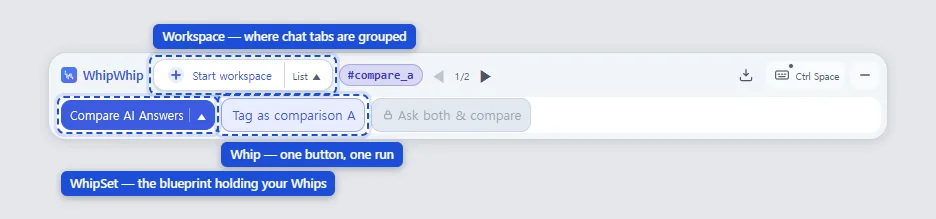
- Whip — the button you just pressed. It runs the prompt steps you set, in order.
- Whipset — a bundle of several whips. The panel shows one bundle at a time, and this is also what you hand to someone else.
- Workspace — where the chats one whip moved through are grouped. Choosing a whipset does not create one; running a whip binds it, and the first chat gives it its name. Membership lives on the chat: run a whip in a chat that already belongs to a workspace and it carries on there, while the home page or a new chat is a fresh start, bound to nothing.
Running across tabs is the normal shape
One button runs across several chatbot tabs; running inside a single tab is the shortened form. You might bring back another AI's objections to the answer in front of you, or send what you typed to the AIs you check. You read each answer in its tab; press Get a verdict and it reads each chat's latest answer right then and sorts them out. The same lineup of AIs follows up in the same chats; change the lineup and it starts over in new chats.
- Whips put the tags on. A whip that needs a chat for another job opens a new chat in a new tab and puts a #tag on it — the tag is the role that chat plays. There is no step of tagging each tab first.
- The panel shows the whips for the tag you are in. An untagged chat shows the main list; a
tagged chat shows that tag's whips. The
⌂toggle in the top row (shortcut ←/→) switches to the main list, and pressing another tag chip takes you to that chat. - A chat about to lose its own tag asks first. Press a whip that would take the tag off a tagged chat and a confirm dialog comes up.
- Side chats come back. In a chat opened for a moment — to get objections — press Revise with this rebuttal and the tidied result goes back to the main chat. An empty answer does not go back. The main chat stays the one you work in.
What a whip receives lands in a variable and moves on to the next step or another chat — the "Where a variable's value comes from" section below is that axis.
The extension absorbs the differences between each site's markup. Two things do differ by site:
- A whip that opens a temporary chat runs on ChatGPT and Gemini only. On Claude, Grok, and Perplexity it is stopped before it starts, with the reason. (The Turn answer into data action is the exception and runs anywhere, but outside ChatGPT the chat it tidies in stays in your history.)
- Sign-in: ChatGPT, Gemini, and Perplexity work signed out. Claude and Grok need you signed in; signed out, a Sign in chip appears in the panel's top row and whips do not start.
Everything else works the same on all five.
How you build
You stack actions in the builder. If you would rather not pick them yourself, copy the instructions on Build with a chat and let the chat you already use write the whipset. The sidebar has three sections — Actions (the palette you stack from) · Chat tags (names you give conversations) · Variables (values captured during a run).
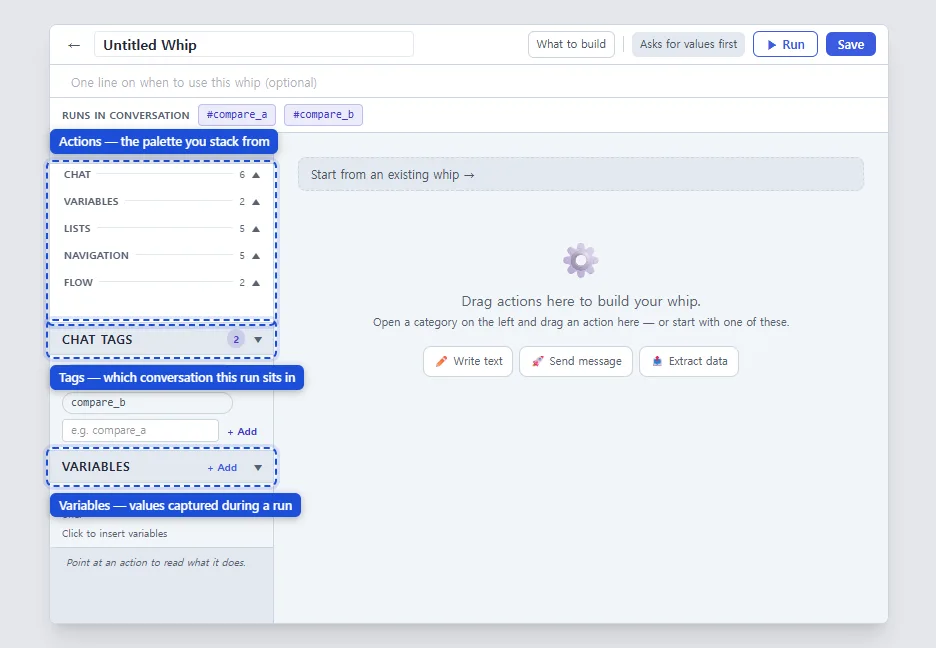
Find the action by what you want to do: 23 actions
The table's groups and action names are exactly what the palette shows.
| What you want | In the palette group |
|---|---|
| Write a prompt and send it | Chat — Write text · Send · Ask for input (asked when the run starts) |
| Read the reply and use it later | Chat — Ask & extract · Turn answer into data (the latest answer, in a shape you set) |
| Ask again when the shape is off | Chat — Validate |
| Ask several AIs the same thing | Chat — Send to several AIs (Wait and collect · Send and tag only · Read the tagged chats) |
| Put a value down, or clear them | Variables — Save value · Reset variables |
| Collect and edit many items | Lists — Append to list · Add or replace list item · Edit list item fields · Remove from list · Summarize list |
| Go to another tab or chat | Navigation — Go to tag · Back to the starting tab · New chat · Other service · Open URL |
| Name the current conversation | Navigation — Tag current chat |
| Let someone choose mid-run | Flow — Ask to choose |
| Show a result | Flow — Show result |
| Bring in a whipset a chat wrote | Flow — Import a whipset (you confirm it in a preview first) |
These 23 actions are everything you can build. Under the hood they run as 19 step types, which is also why nothing outside those 19 step types can arrive inside a whipset someone sends you.
Where a variable's value comes from
| Where it comes from | When | Example |
|---|---|---|
| You type it | Asked when the run starts | topic · audience |
| Captured from a reply | Read out of the answer into a variable | {{var.answer}} |
| Fixed ahead of time | Baked into the whipset | a tone instruction |
| From another variable | Copied by name | draft → for review |
| Filled by the extension | Date, time, weekday, timestamp, UUID, language | {{var.today}} |
Values a whipset remembers
Some whipsets keep a few values in the whipset itself, like the Prompt Factory's art style: you set it once and later runs don't ask again. Open the whipset selector (▼) and they sit in the "Values this whipset remembers" box at the top of the whip map. Click a line to change or clear it right there. Values written by the last run (such as the four prompts the factory wrote) are grouped below.
- The same in every tab. Any tab or workspace using that whipset gets the same value.
- Never exported or published. Whoever receives the whipset sets their own values.
Worth knowing
Sharing
Lock a whipset and export it, and you get one long string. Locking comes first so that what you sent cannot quietly drift from what you kept editing. It is a string, not an upload, so it travels anywhere you can paste. On the receiving side, open the Select whipset dropdown in the extension panel and paste it into 📥 Import: a preview comes first, so you see what is arriving before you accept it.
The extension filters on the way in. Actions you could not have built yourself, unsafe values, tag names that break the rules — if something trips it, it says why and does not accept the whipset.
This site is one end of that exchange. What Recipes carries is that same string, and if you have the extension the new-post page can fill a whipset in for you, so you never copy the string by hand. Edit a whipset you published and post it again, and everyone who took it sees an update waiting in their extension.
Limits
- The extension has no accounts. The whips and settings you build stay in this browser and do not show up on your other devices.
- Your conversations do not leave the browser. The extension's only outbound request reads a post from the Recipes board — a post id and the kind of request (such as an import) go out, no credentials and no conversation data.
- Only the five supported sites. This is not a macro tool that runs anywhere.
- When a chat site changes its UI things can be off for a while, and only the affected service is impacted.
The FAQ answers accounts, storage, and collection in more detail.